Creating DNS records
How to create the records for your custom domain and sender address at your domain provider, with the common pitfalls and how to fix them.
For a custom domain and your own sender address, you create a few DNS records at your domain provider. It sounds more technical than it is: each record has three values that you copy from the card in the dashboard. Most problems come up in the same few places. Here’s what to watch out for.
Where to create the records
Sign in to the service that manages your domain and open the DNS settings. Depending on the provider, they’re called “DNS”, “DNS settings”, “Zone”, “Zone editor” or “Name server records”.
The three values of a record
| In the dashboard | At your provider often | What you enter |
|---|---|---|
| Type | Type, record type | TXT, CNAME or A, exactly as shown |
| Name | Name, host, hostname, subdomain | the name, see below |
| Target | Value, target, content, data | the value, see below |
Leave other fields such as TTL or priority as they are.
The name: the most common pitfall
The card shows the full name, for example ts4f7c2a9e81._domainkey.your-club.com. Most providers add your domain by themselves, though. There you enter only the first part, here ts4f7c2a9e81._domainkey. The card shows that part below each record.
- For the domain itself (such as the SPF record of an address like tickets@your-club.com), many providers use
@, some just leave the field empty. - If you enter the full name anyway, the record ends up under
ts4f7c2a9e81._domainkey.your-club.com.your-club.comwith those providers. We detect this: the card then shows An entry ended up under a doubled name. Your provider adds the domain by itself, so enter only the first part as the name. Delete the record and create it again with the short name.
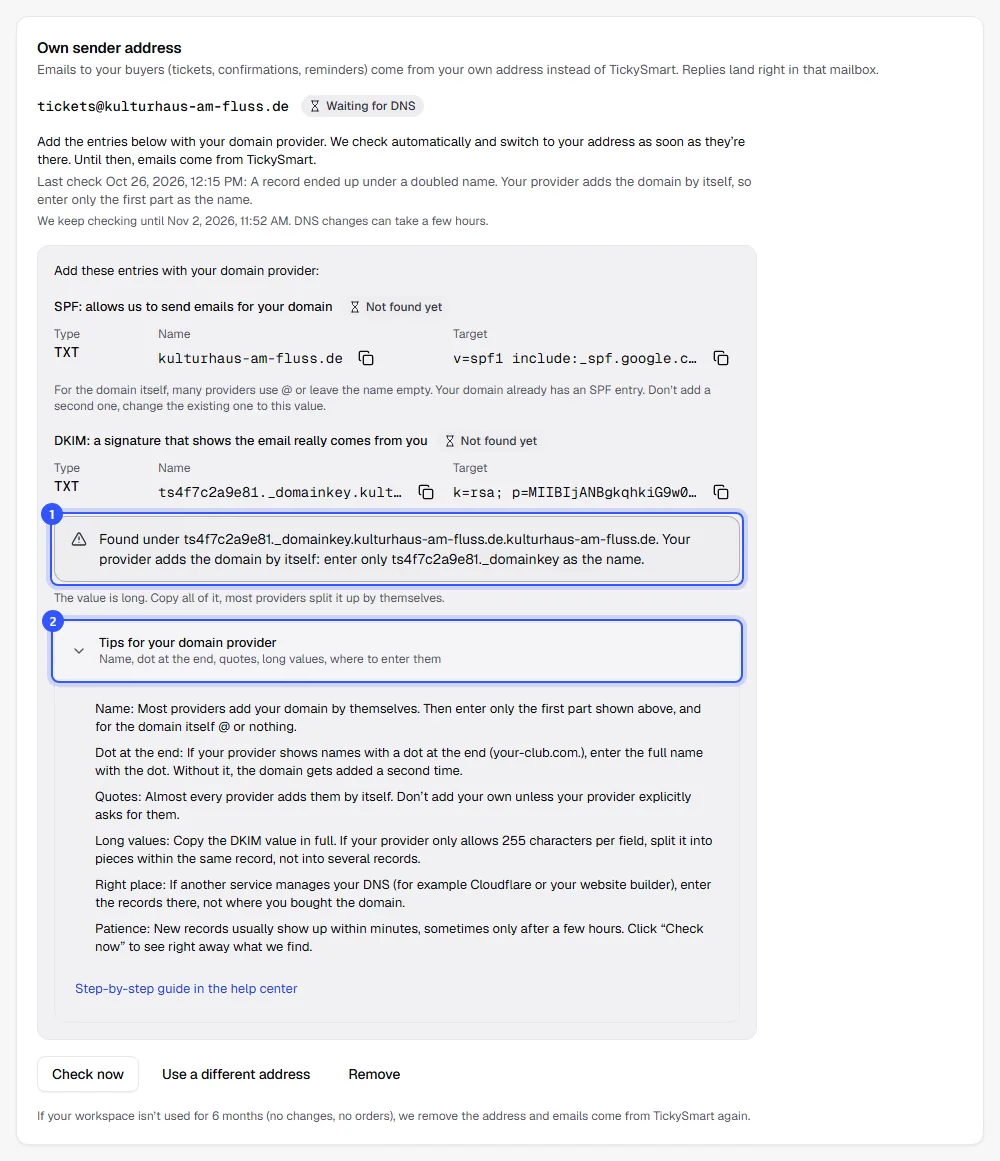
- Dot at the end: Some providers, often ones with zone-file style input, show names with a dot at the end, such as
your-club.com.. There, a name without a dot counts as a short name and the domain gets added. Either enter only the first part or the full name with a dot at the end:ts4f7c2a9e81._domainkey.your-club.com.
The value: exactly as it is
Copy the value with the button next to the field so no character goes missing.
- Quotes: Almost all providers put TXT values in quotes by themselves. Don’t add your own unless your provider explicitly asks for them. Doubled quotes make the value invalid.
- Long values: The DKIM value is more than 300 characters long. Copy all of it, without spaces or line breaks. If your provider only allows 255 characters per field, split it into several quoted pieces within the same record, like
"k=rsa; p=MIIB…" "…AQAB". Never create two separate records for it. - Targets of CNAME records (for your shop’s custom domain): With providers that use a dot at the end, enter the target with the dot, so
domains.tickysmart.io., otherwise they add your domain there too.
Only one SPF record per domain
An SPF record is a TXT record that starts with v=spf1. There may only be one per name, two make both invalid. Then your normal emails suffer too, not just the ones to your buyers.
If your domain already has an SPF record, for example from your mailbox provider, the card tells you and shows the value to change it to. Your current content is already in it. So change the existing record instead of adding a second one.
Records you don’t change
For your own sender address, you don’t touch your MX records. They decide where your emails arrive and stay as they are. Your mailbox keeps working as before.
If you use Cloudflare and set up a custom domain for your shop, set the CNAME record to “DNS only” (grey cloud). Through Cloudflare’s proxy we can’t recognize the domain. For the TXT records of the sender address, this doesn’t matter.
How long it takes
New records usually show up within a few minutes, sometimes only after a few hours. We keep checking automatically. The card shows for each record whether we’ve found it yet. If something different from what we expect is there, we show you what’s currently entered. Click Check now to see the latest state right away.
Frequently asked questions
I entered everything, but it isn’t found
Go through these points one by one:
- Did you create the records at the right service, the one your name servers point to?
- Is the name there without a doubled domain, so without
…your-club.com.your-club.com? - Is the value complete and without extra quotes?
- Is there only one SPF record?
- Have at least a few minutes passed since you saved?
Can I delete the records later?
As long as you use the custom domain or sender address, the records have to stay. Once you remove it in the dashboard, you can delete the records.