Privacy
Delete buyer data automatically after a set period, delete single customers and respond when someone asks what data you hold.
As the organiser, you're responsible for your buyers' data. TickySmart helps: buyer data can be deleted automatically after a set period, single customers can be deleted right away on request, and you can hand over all stored data as a file when someone asks for it. Order numbers, amounts and tickets stay for your accounting.
Delete customer data automatically
- Open Settings → Privacy and choose under Delete after how long buyer data should be kept after an event's last date: 6, 12, 24, 36, 60 or 120 months.
- Click Save.
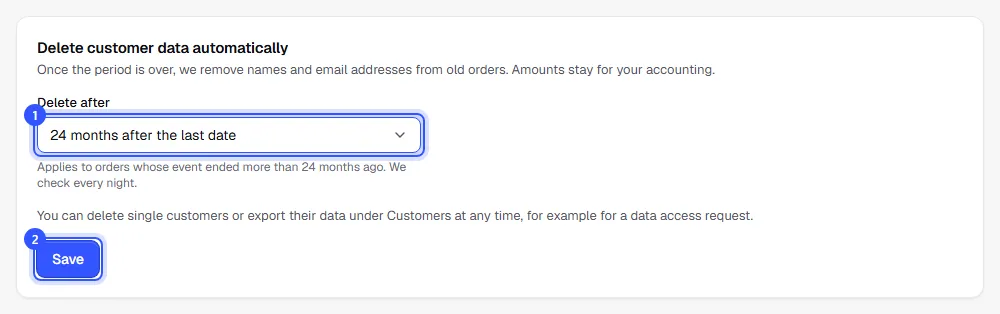
The default is Don’t delete automatically. Owners and admins can change it.
Every night we check which orders are due: those whose event ended longer ago than the period you chose. For events with several dates, the last one counts; for a season ticket, the last date it includes. If something from an order is still valid, such as a purchased voucher or a multi-entry ticket, the order waits until that has expired too. A season ticket with no dates assigned yet waits as well. Waitlist entries are deleted after the same period.
| What's removed | What stays |
|---|---|
| The buyer's first and last name | Order number, date and status |
| The buyer's email address | Amounts, taxes, fees and refunds |
| Names and photos on the tickets | Tickets and ticket types, so your statistics too |
| Recipient and message of purchased gift vouchers | Vouchers with their code and balance |
| Waitlist entries |
Delete a customer on request
If someone asks you to delete their data:
- Open Customers, search for the person and open them.
- Click Delete data and confirm with Delete data.
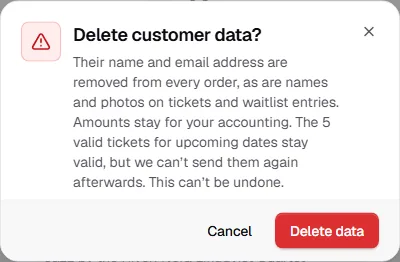
The name and email address disappear from all of the person's orders straight away, open ones included, as does everything else in the table above. Tickets for upcoming dates stay valid, but you can't resend them afterwards because the address is gone. This can't be undone. Owners, admins and the Customer service role can do it.
Respond to a data access request
If someone asks what data you hold about them:
- Open the person under Customers and click Export data.
You get a file in JSON format with everything your workspace knows about this person: your name and contact address from your legal details, the person's name and email address, and all their orders with date, language, acceptance of your terms, amounts, payment method, items, tickets and refunds, including voucher purchases with recipient, message and voucher codes, plus their waitlist entries and, if stored, their tracking consent and where they came from. Photos on tickets are included as a link that works for a week. The file opens in any text editor and can be read by other programs. Send it to the person, for example by email. Owners, admins and the Accounting role can export it.
What else protects your buyers
- Roles without access to customer data only see shortened names and email addresses: Customers.
- Names and emails only appear in exports by owners, admins and accounting: Exports.
- Statistics count views of your event pages without cookies. Tracking pixels only run with consent: Tracking and consent.
Common questions
Do I have to set a retention period?
TickySmart doesn't require one. A period does make sure old data doesn't stay around forever. Amounts and order numbers are kept either way.
Can I get deleted data back?
No. Deleted names and email addresses can't be restored in the dashboard. Export the data first if you still need it.
What happens to the data if I delete my workspace?
Everything is deleted, including orders and customer data: Delete your workspace.