Discount codes
Create discounts with one code for everyone or single-use codes, as a percentage, fixed amount or free ticket, with a period and limits.
Discount codes make tickets cheaper, for example for early birds, regulars or readers of a magazine. A code takes a percentage off the ticket price, a fixed amount off each ticket or makes the ticket free. Buyers enter it in the shop or arrive through a link that already contains the code.
Create a discount
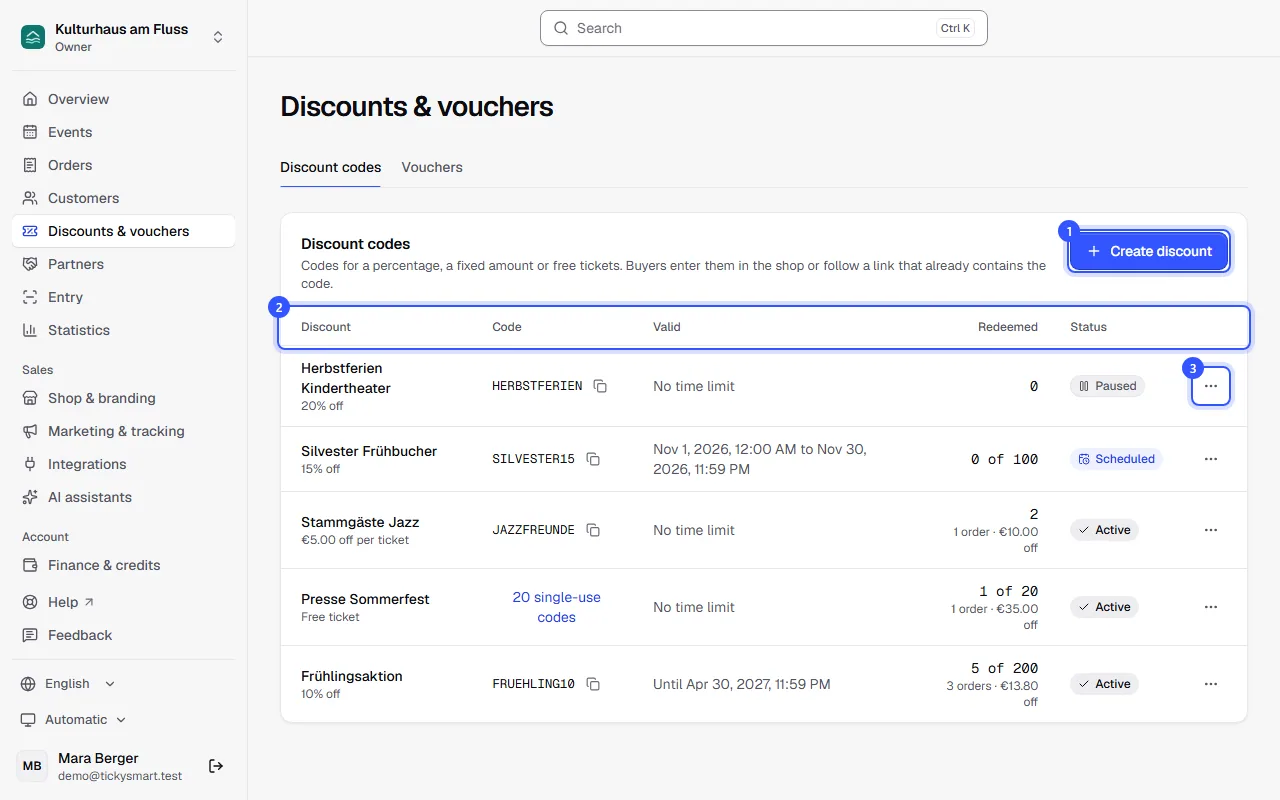
Open Discounts & vouchers. The Discount codes tab lists all your discounts. Owners, admins and the marketing role can create and change them.
- Click Create discount.
In the dialog, give the discount a Name. Only your team sees it; buyers only see the code. Then:
- What the code does: Percentage, a Fixed amount per ticket or a Free ticket. A fixed amount is in one currency, and the code then only works for events in that currency.
- Codes: A Promo code works for everyone, for example SPRING10. It's suggested from the name as you type, and you can change it. Single-use codes are generated for you, and each one is good for exactly one ticket.
- Where the code applies: All events, including events you create later, or Selected events. There you pick whole events or only certain ticket types.
- Limits: How many tickets the code discounts in total, per order and per buyer, and the minimum order value. All optional.
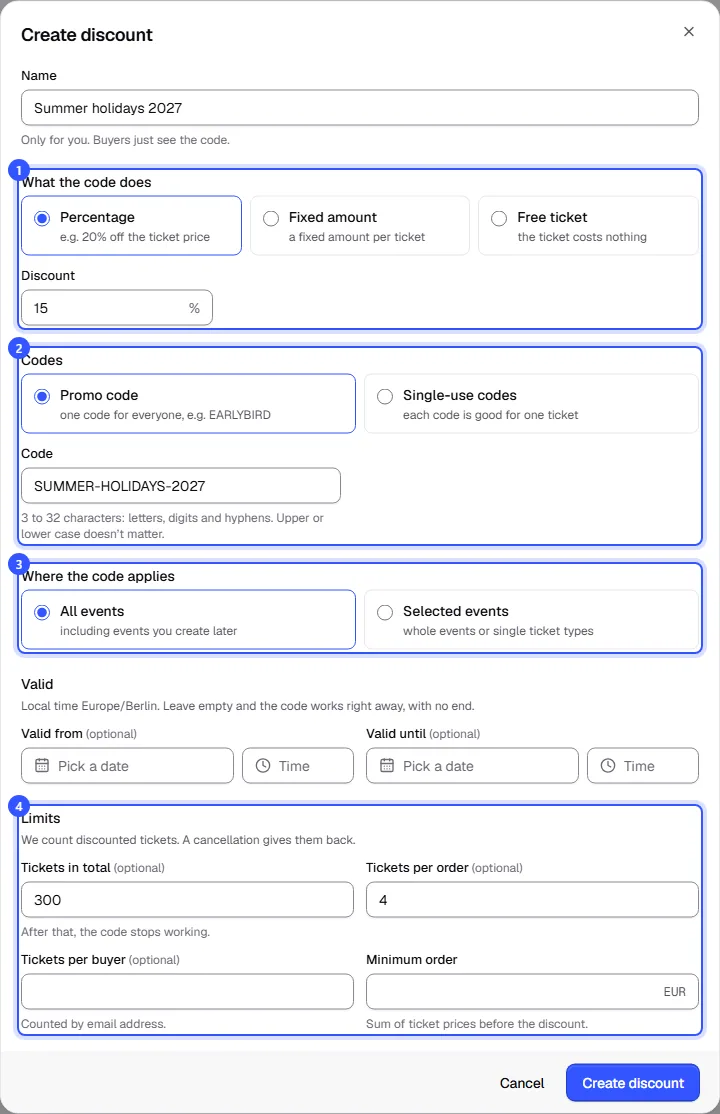
Under Valid, set when the code starts and ends, in your workspace's local time. Left empty, it works right away and indefinitely. Finally, click Create discount.
| Field | Note |
|---|---|
| Tickets in total | Promo codes only. After that, the code stops working. |
| Tickets per order | Any extra tickets in the order cost the regular price. |
| Tickets per buyer | Counted by email address. |
| Minimum order | Total of the ticket prices before the discount. |
| Unlock secret ticket types | Anyone who enters the code also sees the secret ticket types it applies to. |
Discounted tickets are what counts. If someone cancels, they become available again.
How buyers redeem the code
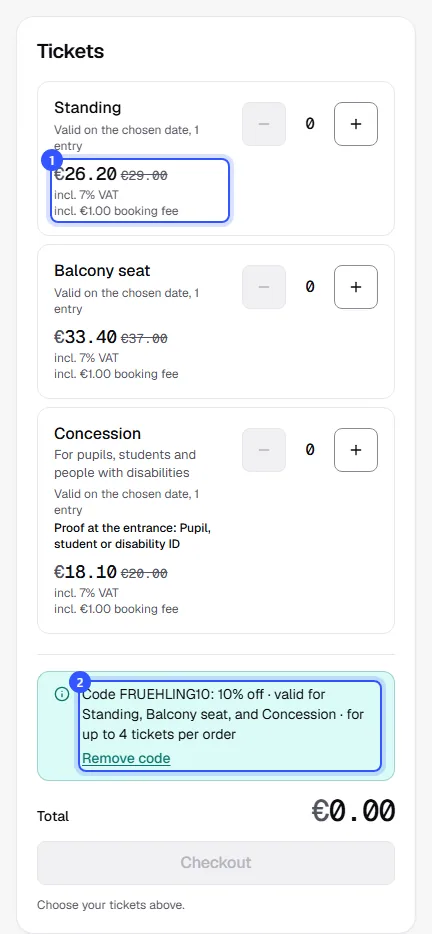
On an event page, below the ticket selection, buyers find Redeem a code. Once redeemed, they see what the code does and the new prices next to the old ones.
- Prices of the ticket types the code applies to drop right away.
- Below, the buyer sees what the code applies to. Remove code takes it out again.
Keep track of your discounts
The Redeemed column shows the discounted tickets and, below that, how many paid orders there were and how much discount they got. Using the menu at the end of each row you can:
- Edit the discount, for example to extend the period,
- stop it for a while with Pause and later Resume,
- for single-use codes, view the codes, download them as Excel or CSV, or create more with Add codes,
- Delete it, as long as no code has been redeemed.
| Status | Meaning |
|---|---|
| Active | The code can be redeemed. |
| Scheduled | The period hasn't started yet. |
| Expired | The period is over. |
| Paused | You paused the discount. Buyers are told the code doesn't exist. |
| Used up | The limit has been reached. |
Common questions
Can a buyer combine several codes?
No, one discount code applies per order. A voucher can be redeemed on top and then pays part or all of the rest.
Does the discount apply to the booking fee?
The discount applies to the ticket price. A fixed booking fee stays the same; a percentage fee is calculated from the reduced price. Free tickets don't carry a fee either.
How do I hand out single-use codes?
Download them as Excel or CSV, or copy them all via View codes and Copy all. That's also where you see which codes have been redeemed.
Why can't I delete my discount?
This code has already been used. Pause the discount instead of deleting it. That way your figures and orders stay traceable.
Can I change the type of codes later?
No. Whether it's a promo code or single-use codes is fixed once created. You can change the promo code itself, the discount, the period and the limits any time.