Cancel and refund
Cancel single tickets or a whole order, refund the full amount, by your cancellation rules or partly, and let the buyer know.
You can cancel single tickets or the whole order, with or without a refund. Cancelled tickets stop being valid right away, and their places go back on sale, to the waitlist first. The money goes back to the buyer's payment method through the order's payment provider.
Cancel tickets
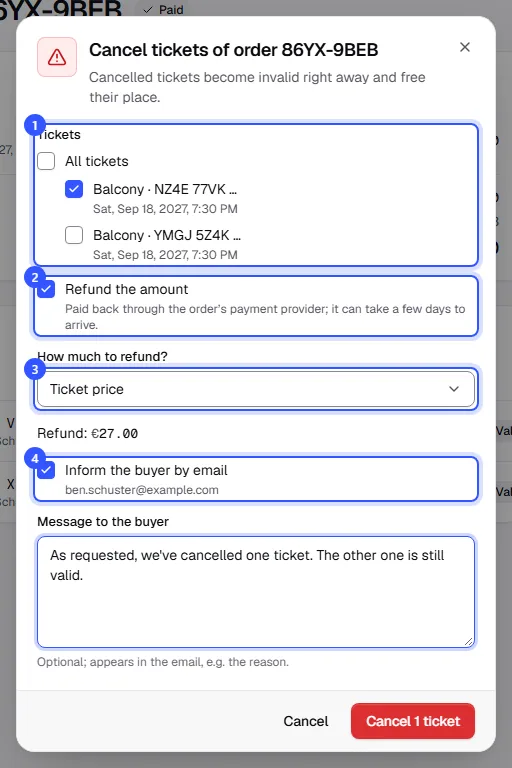
- Open the order and click Cancel tickets. Choose the tickets. All of them are selected to start with.
- Refund the amount is ticked if there is something to refund and your role is allowed to. Untick it if no money should go back.
- Under How much to refund? you set the amount; the options are below. Underneath you see how much goes back.
- Leave Inform the buyer by email ticked and add a message if you like, such as the reason. Then click the red cancel button.
| How much to refund? | What goes back |
|---|---|
| Ticket price | The price of the chosen tickets including their booking fee. If you cancel all remaining tickets, it's the whole amount still open. |
| By the cancellation rules (…) | What a buyer would get back under your cancellation rules right now; you keep the cancellation fee. Only shown while a step applies to the tickets. |
| Custom amount | An amount you enter, at most what's still open on the order. |
If you cancel all tickets, the order becomes Cancelled. If you cancel some, it stays Paid and only the cancelled tickets stop being valid. Required add-on tickets, such as one parking ticket per admission ticket, are cancelled together with their main ticket.
Track the refund
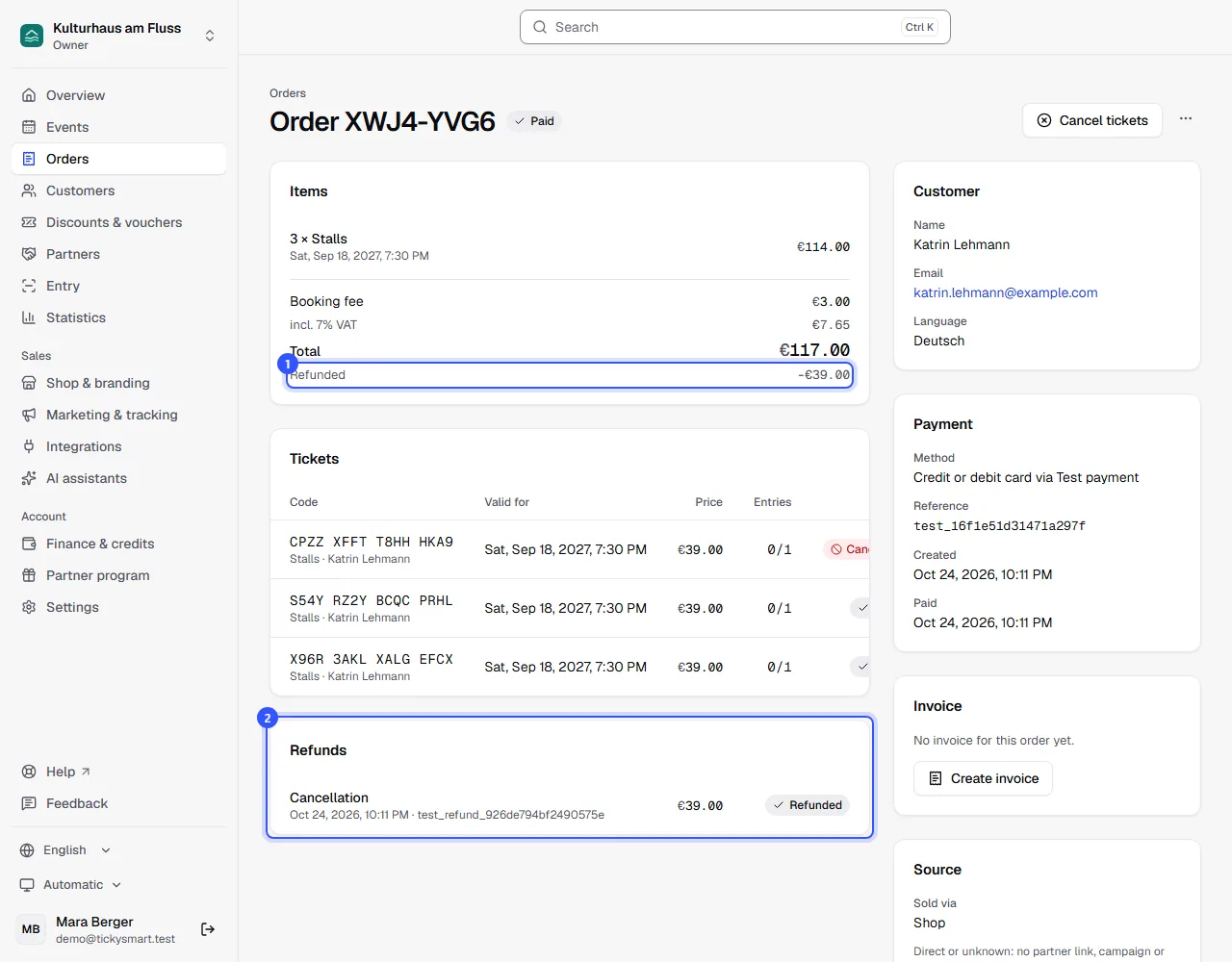
After cancelling, the ticket has the status Cancelled. The refund runs in the background through Stripe, Mollie or PayPal. It can take a few days for the money to reach the buyer.
- In the lines, Refunded shows how much went back.
- The Refunds card lists every refund with reason, time, amount and status.
| Status | Meaning |
|---|---|
| In progress | Requested from the payment provider. |
| Refunded | The payment provider has sent the money back. |
| Failed | The payment provider declined. The reason is shown below. |
| Transfer yourself | Bank transfer: you transfer the money back yourself and then tick it off, see Bank transfer. |
Vouchers and fees
- Partly paid with a voucher: Money goes back to the payment method first, and the rest back onto the voucher. The buyer can then use it again.
- Cancel a voucher purchase: For an order of vouchers, the button is Cancel voucher order. This only works while none of the vouchers has been used. Afterwards they're all blocked.
- Free orders: There's nothing to refund, so the box is greyed out.
- TickySmart fee: When the buyer gets their money back, you get the credits or the fee for those tickets back depending on your prices, and always for a cancelled date or event. If you cancel without a refund, the fee stays.
Common questions
My role can't refund
Then Refund the amount is greyed out. Owner, Admin and Customer service can refund. You can cancel without a refund or ask someone with that permission.
Can I refund money without cancelling tickets?
No. In the dashboard, a refund always comes with a cancellation. With Custom amount you decide how much goes back.
Can I make a cancelled ticket valid again?
No. If the buyer wants to come after all, they order again in the shop.
The refund failed
The reason is shown below the status. The Reference under Payment opens the payment directly in Stripe, Mollie or PayPal, where you'll find more details. Then sort it out with the buyer.
A whole date is called off
Don't cancel each order one by one. Cancel the date instead, and all buyers are refunded and informed in one go: Changes to a date.
Can buyers cancel themselves?
Yes, if you set up cancellation rules. They then cancel on their order page, and the money goes back automatically.