Reschedule or cancel a date
Move a date with tickets sold to a new time or cancel it, with an email to buyers and a refund if you like.
If a date has to move to another day or can't take place, you handle it in the Dates section using the menu next to the date. Buyers automatically get an email if you want them to. If the whole event with all its dates is affected, see Cancel an event.
Reschedule a date
Choose Reschedule in the date's menu.
- Pick the new Start. Doors and end move by the same amount, unless you change them yourself.
- Inform buyers by email is already switched on if tickets have been sold for the date. Below it you see how many tickets are affected, passes included. Use Message to buyers to explain why.
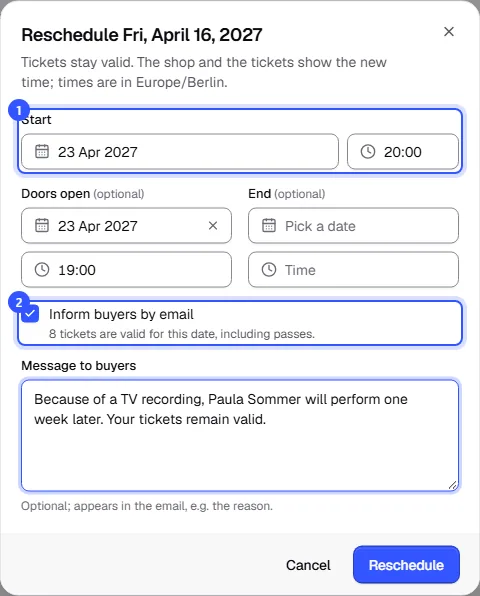
Click Reschedule. After that:
- All tickets stay valid; nobody needs to do anything.
- The shop and the tickets show the new time. The shop also shows Rescheduled, previously … next to the date, so nobody turns up on the old day.
- Buyers get an email with the old and new date, your message and their tickets attached.
Cancel a date
Choose Cancel date in the date's menu.
- At the top you see how many orders and tickets are affected, how much would be refunded in total and how many orders for the date are still waiting for a bank transfer.
- Under Sold tickets you decide what happens to the tickets (see the table).
- If Inform buyers by email is on, everyone affected gets an email with a link to their order. Use Message to buyers for the reason or a replacement date.
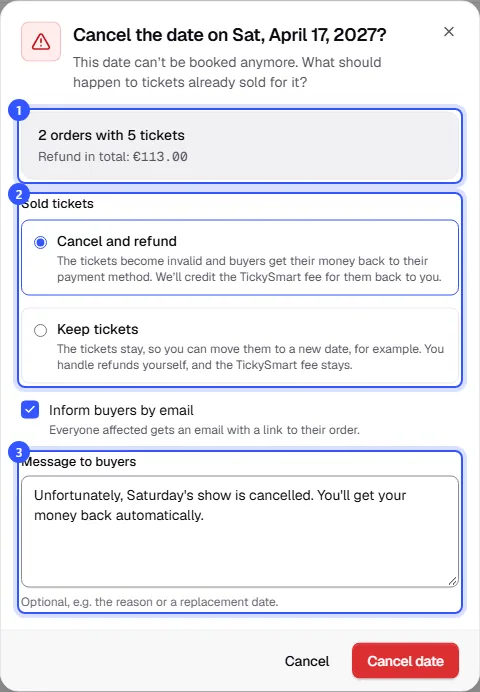
| Choice | What happens |
|---|---|
| Cancel and refund | The tickets become invalid and buyers get their money back to their payment method. We’ll credit the TickySmart fee for them back to you. |
| Keep tickets | The tickets stay, so you can move them to a new date, for example. You handle refunds yourself, and the TickySmart fee stays. |
Click Cancel date. The date can no longer be booked, and the shop shows it as Cancelled. A cancellation can't be undone.
Orders for the date that are still waiting for a bank transfer are always cancelled. If Inform buyers by email is on, buyers are told by email not to transfer anything.
Passes and multi-day tickets
If a ticket is valid for several dates, such as a festival pass, it stays valid for the remaining dates and isn't refunded. Buyers learn about the cancellation by email if you inform them.
Keeping track in the dashboard
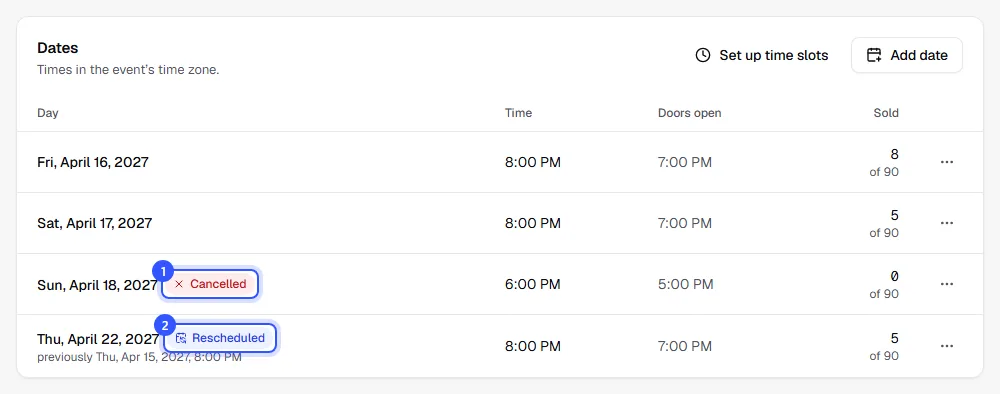
In the list of dates, rescheduled dates are marked Rescheduled with the original start below, and cancelled ones Cancelled. Even after several reschedules, you always see the very first start time.
Common questions
Who can reschedule and cancel?
Owner, Admin and Editor. Cancel and refund also needs permission to refund money, which Owner and Admin have. With the Editor role, you can only cancel a date with tickets sold using Keep tickets.
I kept the tickets. How do they move to the replacement date?
Add the replacement date, then rebook the tickets in each affected order with Rebook to another date: Change an order. Without rebooking, tickets for a cancelled date are turned away at the entrance.
When should I reschedule and when should I cancel?
Reschedule if the date takes place on another day or at another time and the tickets should stay valid. Cancel if it won't happen at all or buyers should get their money back.
Do I get the TickySmart fee back?
Yes, if you cancel with Cancel and refund. If you keep the tickets, the fee stays.