Share links
Share an event's figures with co-organisers, artists or sponsors via a link, without signing in and always up to date.
A share link gives someone outside your team access to an event's figures, such as an artist's agency, a co-organiser or a sponsor. Whoever has the link sees only what you choose, without an account or signing in, and always the latest numbers. Owners, admins and the Editor role can create share links.
Open sharing
- Open Statistics, choose the event under Event and click Share next to it. The button appears as soon as a single event is selected.

Create a link
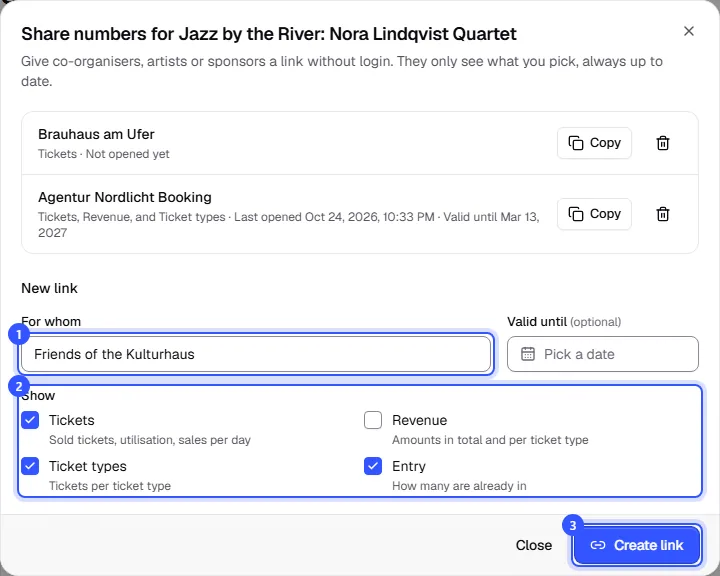
The top of the dialog lists the links that already exist for this event. Below, you create a new one:
- Under For whom, enter who the link is for, such as the agency's name. If you like, pick a date under Valid until. The link then works until the end of that day in your workspace's time zone.
- Under Show, choose what the link shows.
- Click Create link. The link is copied to your clipboard straight away, ready to send by email, for example.
| Section | What the recipient sees |
|---|---|
| Tickets | Sold tickets, utilisation, sales per day |
| Revenue | Amounts in total and per ticket type |
| Ticket types | Tickets per ticket type |
| Entry | How many are already in |
Tickets and Ticket types are selected by default, so no amounts and no entry figures. Only add revenue if the recipient really should see it.
What the recipient sees
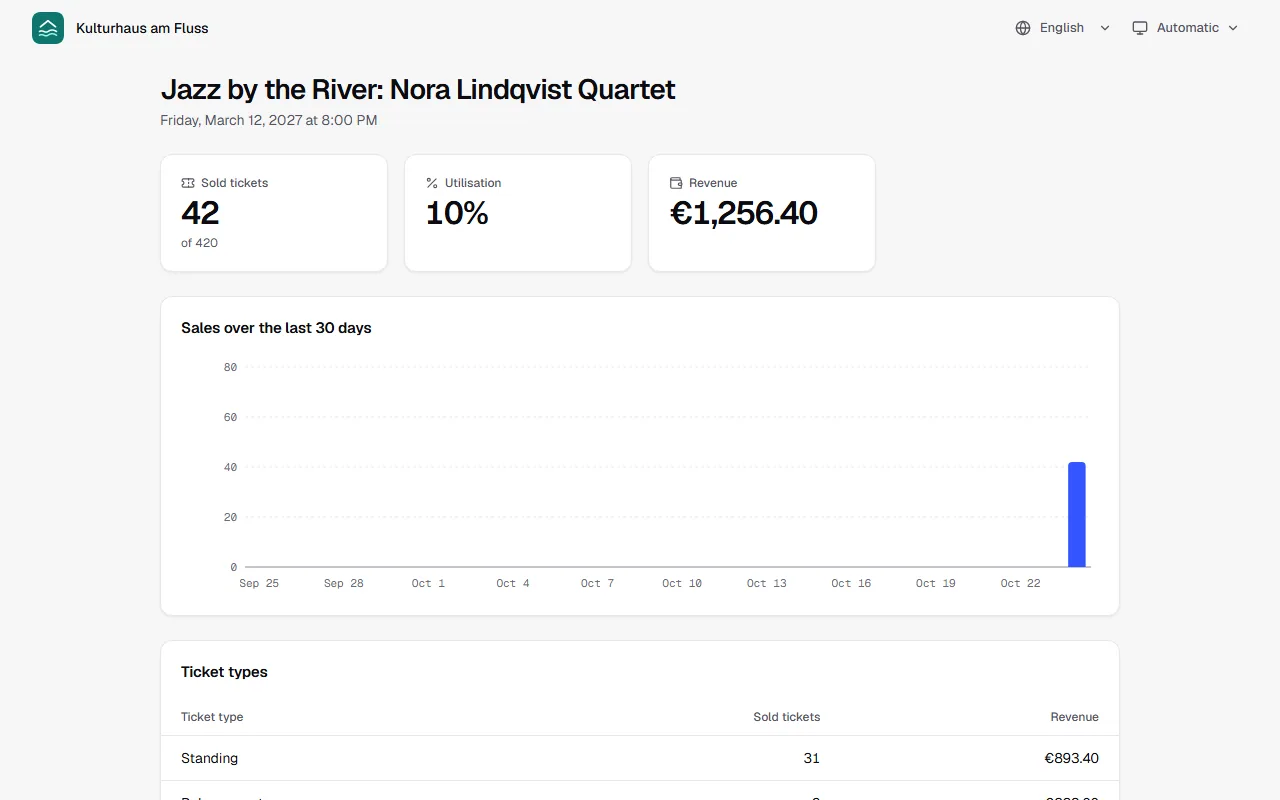
The page shows your workspace's name and logo at the top, then the event with its dates and the sections you chose. It refreshes itself every minute. The recipient can change language and appearance at the top right. Buyer names or email addresses never appear there.
Manage links
Open Share again. Each link shows what it includes, when it was last opened and until when it's valid.
- Copy copies the link again.
- The bin icon deletes it. It stops working immediately.
Anyone opening a deleted link sees This link doesn't exist anymore, and for an expired one This link has expired.
Common questions
Can I change a link afterwards?
No. Delete it and create a new one with the sections you want. You'll need to send the new link again.
Should I create a separate link for each recipient?
Yes, that's a good idea. You'll see for each one whether it has been opened, and you can delete it on its own without affecting the others.
How is this different from partner links?
A share link shows an event's figures. A partner link is a sales link for partners who earn a share of their sales. Partners get their own page with their clicks, sales and commission.
Anyone with the link can pass it on. Is that a problem?
Anyone who knows the link sees the figures you chose. So only share what the recipient may see, give the link an expiry date and delete it once it's no longer needed. Search engines don't index the page.