Devices at the door
See which phones and scanners your team scans with, whether they're online and whether scans still need to upload, and rename or sign out devices.
Every phone, tablet or scanner device on which someone from your team scans with their own account appears in the device list. It shows who it belongs to, whether it's connected right now and whether any scans still need to upload. Owners, admins and editors manage devices.
The device list
Open Entry → Devices.
- Connection: whether the device can be reached right now. The table below explains each status.
- Still to upload: scans the device checked without a connection and hasn't sent yet. Normally this says Nothing.
- Use the menu at the end of the row to rename or sign out the device.
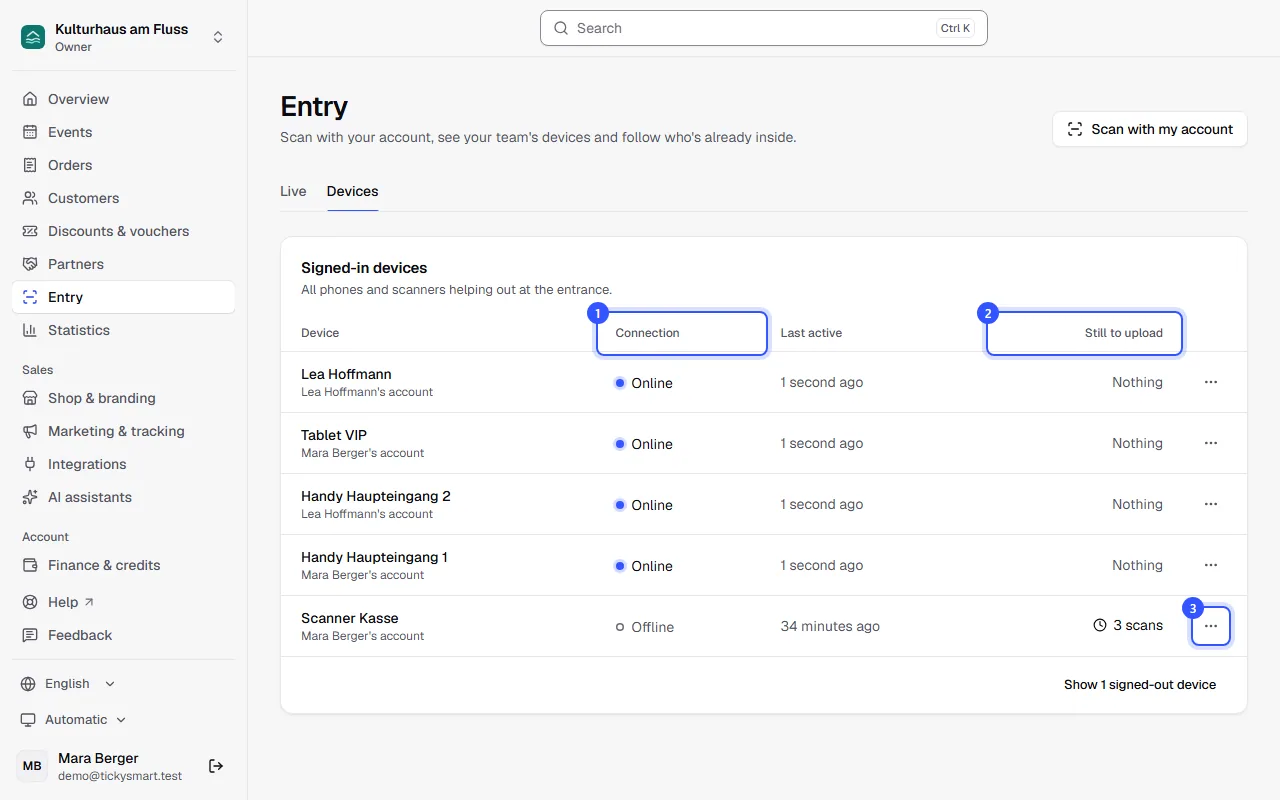
Every device belongs to a team member. Below the name you see whose account it is, for example Lea Hoffmann's account. A new device starts out with the person's name, and you can rename it at any time. The list updates by itself. You can also see a single person's devices under Team when you edit them: Roles and permissions.
| Connection | What it means |
|---|---|
| Online | The device checked in within the last two minutes. The scan app checks in every 30 seconds. |
| Offline | Nothing heard for a while, for example because the connection dropped or the app was closed. The app keeps scanning offline. |
| Not connected yet | Created, but the scan app has never been opened with it. |
| Signed out | The device has been signed out. |
Rename a device
Choose Rename in the menu. A clear name helps your team, for example "Phone north entrance". The name also appears next to every scan in the live view.
Sign out a device
Choose Sign out in the menu and confirm with Sign out device. The device can't scan anymore. To use it again, the person signs in on it again with their account, using Scan with my account in the dashboard.
Signed-out devices are hidden from the list. The button below the list brings them back.
Common questions
A phone has been lost
Sign it out right away. Whoever was scanning with it signs in on another device with their own account via Scan with my account and carries on there.
Why does a device show Offline while people are scanning with it?
The connection at that entrance is weak or gone. The scan app then checks tickets by itself and uploads the scans as soon as it's back online. Until then, the Still to upload column keeps count. More in Scanning offline.
Why is my name in the list several times?
Every time you use Scan with my account, a device with your name is created. Sign out old entries you no longer need.
What happens to the devices when someone leaves the team?
If you remove the person from the team, their devices are signed out right away. If you give them a role that can't scan, their devices can't scan anymore either. The scan app then shows Device signed out. Their scans stay in the live view and your statistics.