The public API
What you can do with the TickySmart API, how to authenticate with an API key, and how errors, limits and formats work.
The API lets your own software work directly with your workspace: create events, pull in orders, keep customers in sync with your CRM. It's the same API the dashboard runs on. This page explains how it works in general. Every endpoint, with its fields and examples, is in the API reference.
Getting started
- Open Integrations and, under API keys, click API docs. The API reference opens in a new tab. You can also go straight to api-docs.tickysmart.io.
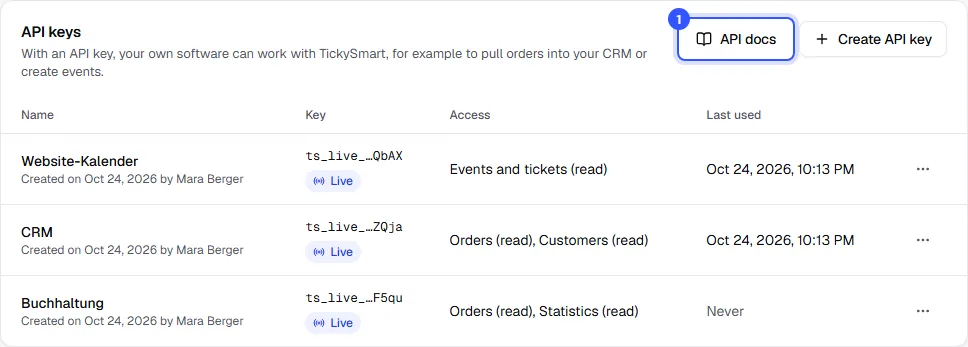
- Create an API key and give it only the access your software needs: Create and manage API keys.
- Send your first request, for example to list your events.
Owners and admins can see the Integrations page.
Base URL and authentication
All requests go to https://api.tickysmart.io/v1. Every path contains your workspace's short name, as it appears in the dashboard address after /t/. Send the key in the Authorization header:
curl https://api.tickysmart.io/v1/tenants/kulturhaus-am-fluss/events \
  -H "Authorization: Bearer ts_live_…"
- A key only works for the workspace you created it in.
- Keys belong to the workspace, not to a person. If someone leaves the team, their keys keep working.
- Keep the key on your server. Never put it in a website or an app that other people can download.
What the API covers
The API covers the areas you can give a key access to:
| Area | What's included |
|---|---|
| Events and tickets | Events, dates, ticket types, extras, areas and venues |
| Orders | Orders, cancellations, refunds and the waitlist |
| Customers | Buyer names and email addresses, also in orders |
| Discounts, vouchers and partners | Promo codes and vouchers, plus partner links |
| Statistics | Revenue and sales figures |
| Webhooks | Create and manage webhook endpoints |
Team, payment accounts, billing, settings, custom domains and the API keys themselves are only available in the dashboard. If a key asks for them, the API responds with API_KEY_NOT_ALLOWED.
Instead of checking for news over and over, you can also get notified: Set up webhooks.
Test and live
Keys start with ts_live_. In a test environment where payments are simulated, they start with ts_test_. A key only works in the environment it was created in. Your list of keys shows Live or Test for each one.
Errors
Every error comes with an HTTP status and always has the same shape:
{ "code": "ORDER_NOT_FOUND", "message": "Order not found" }
Build your logic on code. Codes stay the same, while message is a hint for developers and may change. Some errors also include details, such as the quantities still available when tickets run out.
| Status | Code | Meaning |
|---|---|---|
| 400 | INVALID_INPUT | The input is invalid; message names the fields |
| 401 | UNAUTHENTICATED | No key was sent, or the header doesn't start with Bearer ts_ |
| 401 | INVALID_API_KEY | The key is unknown or revoked |
| 401 | API_KEY_WRONG_MODE | A test key in the live environment, or the other way round |
| 403 | API_KEY_SCOPE_MISSING | The key doesn't have access to this area |
| 403 | API_KEY_NOT_ALLOWED | This is only possible in the dashboard |
| 404 | TENANT_NOT_FOUND | The short name in the path doesn't match the key's workspace |
| 404 | …_NOT_FOUND | The object doesn't exist, e.g. EVENT_NOT_FOUND |
| 429 | RATE_LIMITED | Too many requests, see below |
| 500 | INTERNAL_ERROR | Something went wrong on our side; retry later with the same Idempotency-Key |
Limits and retries
- Requests per key: Each key can send a fixed number of requests per ten seconds; the exact number is in the API reference. Every response shows what's left in
RateLimit-Limit,RateLimit-RemainingandRateLimit-Reset. Above the limit you get429withRetry-After: wait that many seconds, then carry on. - Safe retries: Send your own
Idempotency-Keyheader, for example a UUID, withPOST,PATCH,PUTandDELETErequests. If the connection drops, repeat the request with the same value. For 24 hours you get the stored response, and nothing happens twice. - Long lists: Orders, customers and webhook deliveries come in pages. The response contains
itemsandnextCursor; send that value as?cursor=…to get the next page. On the last page,nextCursoris empty (null).
Money, time and languages
- Amounts are whole numbers in the smallest unit of the currency, always with an ISO code:
2800withEURis €28.00, while for currencies without decimals such asJPY,2800means exactly 2,800. - Timestamps use ISO 8601 with a time zone. Every event has its own time zone, so you can show local times correctly.
- Texts such as titles and descriptions come per language, like
{ "de": "Sommerfest", "en": "Summer Festival" }. If a language is missing, your shop's default language applies. - Tax rates are percentages (
7,8.1). Each event decides whether its prices include tax or not.
The API version is part of the path (/v1). New fields, endpoints and events are added without a new version, so ignore anything your software doesn't recognise.
Common questions
Can I call the API from the browser on my website?
No. Anyone visiting your website could read the key. Call the API from your server and only pass on the data your website needs. If you just want to show your shop on your website, you don't need the API at all.
What does "Test" mean next to a key?
The key comes from a test environment where payments are only simulated, and it only works there. Your workspace creates live keys.
Are there ready-made libraries for my programming language?
We don't offer our own libraries. The API reference describes everything as an OpenAPI file that you can download there. Use it to generate a client with common tools, or import it into apps like Postman to try things out.
How do I know what access an endpoint needs?
The API reference lists it for every endpoint under "Required access", for example "Orders: read". If the key doesn't have that access, the API responds with API_KEY_SCOPE_MISSING.