Age check at the door
How the scan app asks for an ID check on tickets with an age limit, and what your staff do next.
If an event or ticket type has an age limit, the scan app asks staff to check ID on the first entry. It shows right away the date of birth someone must be born on or before, so nobody has to do the maths.
Set the age limit
You set the limit for the whole event or per ticket type. How that works is explained in Age limit. On the ticket type, you'll find it in the Entry section:
- Under Age limit, choose whether the event's limit applies, whether this ticket type has none (None) or its own, for example 18+ for a VIP lounge with a bar.
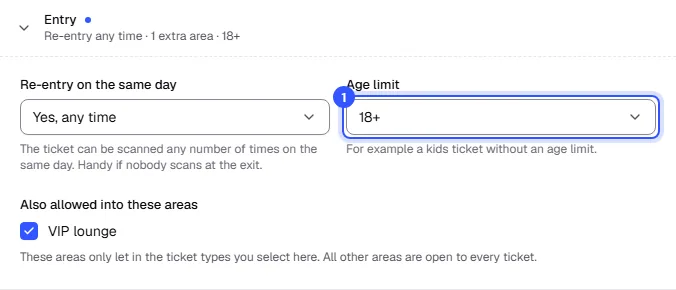
Buyers confirm the limit in the checkout. At the door, the limit currently set on the event or ticket type always applies.
At the door
On the first scan of such a ticket, the app shows yellow: First entry: please check their age. Below that, in large type, the minimum age and the date of birth someone must be born on or before. The app works out the date for today at the event's location.
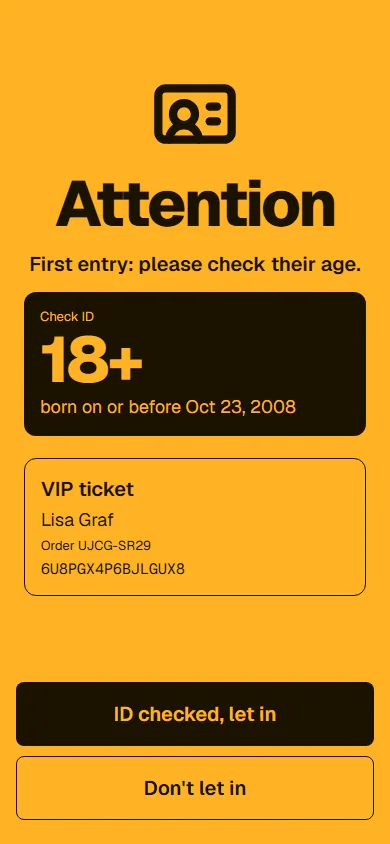
Staff compare the date of birth on the ID and then tap:
- ID checked, let in: only now does the scan count as an entry. The app shows green with ID checked, let in.
- Don't let in: the ticket stays unused.
For group tickets, the app asks staff to check the ID of everyone in the group.
What applies afterwards
- Re-entry: Anyone who was let in with a checked ID isn't asked again. This also applies on later dates, for example on the second day of a festival pass.
- Wrong area: If Wrong area comes up on the first entry and staff let the guest in anyway, that also counts as a checked ID. The app shows both notes together.
- Offline: The age limit is part of the ticket list on the device, so the check also works without a connection.
- Check only: In this mode, the app shows the prompt but doesn't let anyone in.
In the live view, these scans show ID checked (18+).
Common questions
Do staff have to check ID on every scan?
No, only on the first entry. After that, the ID counts as checked for that ticket.
What do I do if someone is too young?
Tap Don't let in. Whether and how you refund them is up to you. You do that in the order: Cancel and refund.
Does the age limit apply to the guest list?
Yes. Guests get tickets of the ticket type you choose under Valid like, including its age limit.
Does the app check the ID itself?
No. The app only tells staff that an ID check is needed and for what age. Your staff look at the ID.