Bulk actions
Select several events in the list and publish, cancel or delete them in one go.
In the event list you can select several events and publish, cancel or delete them with one click. That saves time, for example when you've created a series as drafts and want all the nights to go on sale at the same time.
Select events
Open Events. It's easiest to filter the list first, for example by searching for the series title.
- Tick each event you want to work on. The checkbox in the table header selects every event currently shown in the list.
- A bar appears at the bottom with the number of selected events and the actions.
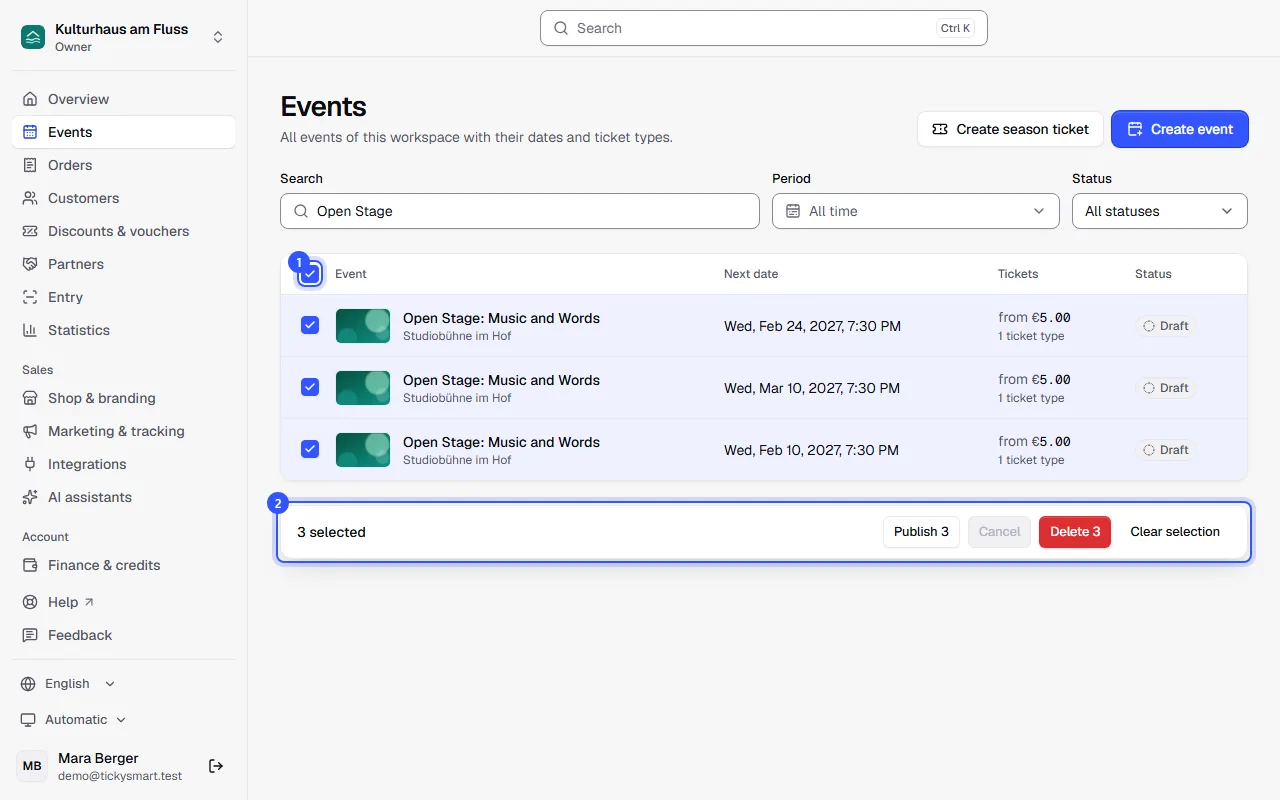
The actions
The number on each button shows how many of the selected events the action applies to. The others stay as they are.
| Button | Applies to | What happens |
|---|---|---|
| Publish 3 | Drafts | The events go on sale. If an event is still missing something, such as a date, it stays a draft. |
| Cancel 3 | Published events | After you confirm: All their dates are cancelled. Sold tickets are cancelled and refunded, and buyers get an email. |
| Delete 3 | Drafts | After you confirm: The drafts are removed along with their tickets, dates and images. This can't be undone. |
| Clear selection | The selection disappears; nothing else happens. |
The events are processed one after another. Afterwards a message tells you how many worked. If something didn't, it also says how many and why.
Common questions
Who sees the checkboxes?
Anyone who can change or publish events, so Owner, Admin and Editor. Only Owner and Admin can cancel events with tickets sold from the bar, because money is refunded.
Why is a button greyed out?
None of the selected events fit. If you only selected drafts, for example, there's nothing to cancel.
Can I change the price or venue of several events at once?
No, the bar only publishes, cancels and deletes. Everything else you change in each event.
Can I undo a deletion?
No. Deleted drafts are gone along with their dates, ticket types and images. Published and cancelled events can't be deleted at all.