Time slots
Sell tickets with a time, for exhibitions, museums or tours, with opening hours, people per slot and closed days.
At exhibitions, museums, tours or pools, visitors don't book a concert at 8 pm but a visit at a time of their choice. With time slots you say once when you're open and how long a slot lasts. We create the individual slots automatically and keep them bookable ahead.
Set up time slots
Open the event, go to Dates and click Set up time slots.
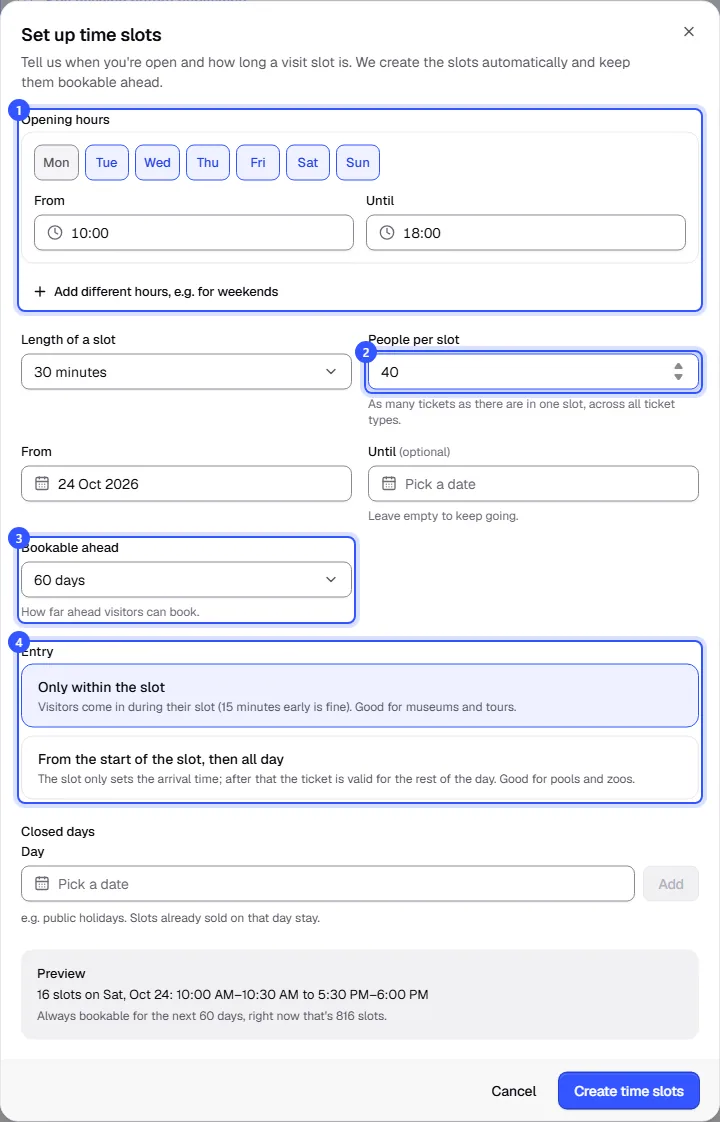
- Opening hours: pick the weekdays and enter your opening times. If weekends have different hours, click Add different hours, e.g. for weekends.
- Length of a slot and People per slot: slots follow on directly from each other. The number of people applies per slot, across all ticket types.
- From, Until and Bookable ahead: without an end date, the schedule just keeps going. Visitors can always book as many days ahead as you choose here.
- Entry: how long the ticket is valid on the day, see below.
Below that, enter Closed days, such as public holidays. The Preview shows how many slots a day gets and how many are bookable right now. Click Create time slots.
| Entry | Meaning |
|---|---|
| Only within the slot | Visitors come in during their slot (15 minutes early is fine). Good for museums and tours. |
| From the start of the slot, then all day | The slot only sets the arrival time; after that the ticket is valid for the rest of the day. Good for pools and zoos. |
You can have up to 200 slots a day and up to 3,000 bookable at once. If it would be more, the preview tells you. Make the slots longer or shorten how far ahead people can book.
Ticket types for time slots
Add ticket types as for any event, such as "Adults", "Concession" and "Family ticket". Every ticket type is available in every slot, and the buyer picks theirs when buying. The number of tickets per slot is controlled by the slot's number of people.
An annual pass without a time is a multi-entry card with a validity period, see What a ticket is valid for. It's then valid without a time slot.
Keep an eye on your slots
Once saved, Dates shows the Time slots card: the settings at the top and the upcoming days with tickets sold below. Click a day to see its slots; full ones are marked Full.
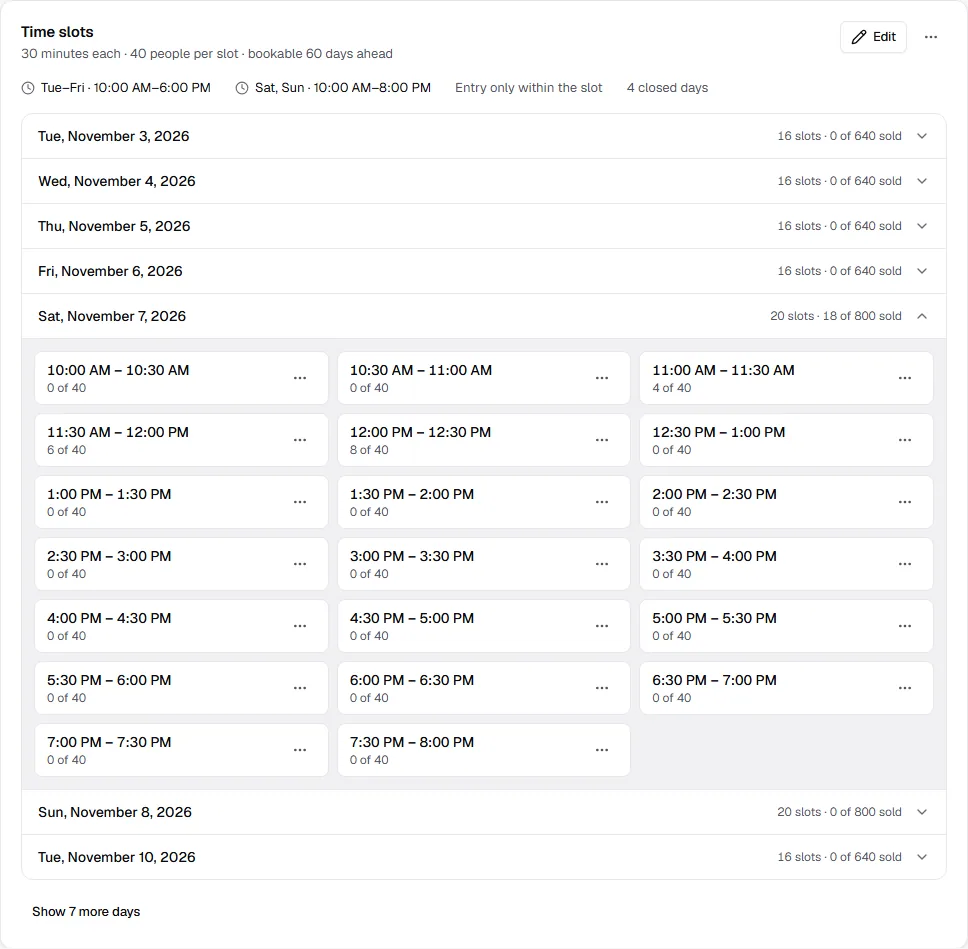
- From a slot's menu you can move it or choose Cancel slot. This works like any date, see Reschedule or cancel a date.
- With Edit you change the schedule. New opening hours and a new number of people apply to upcoming slots. Slots with sales are always kept.
- From the card's menu, choose Remove time slots. Upcoming slots without sales are deleted; slots with sales stay as regular dates.
Single slots can't be deleted. To close on a day, add it to the closed days. Slots already sold on that day stay; cancel them one by one if needed.
Dates you add by hand appear below under Other dates, such as an evening tour.
How visitors book
The shop shows the opening hours with the event. In the ticket selection, the visitor first picks a day in the calendar, then the time, then their tickets. Full slots can't be chosen.
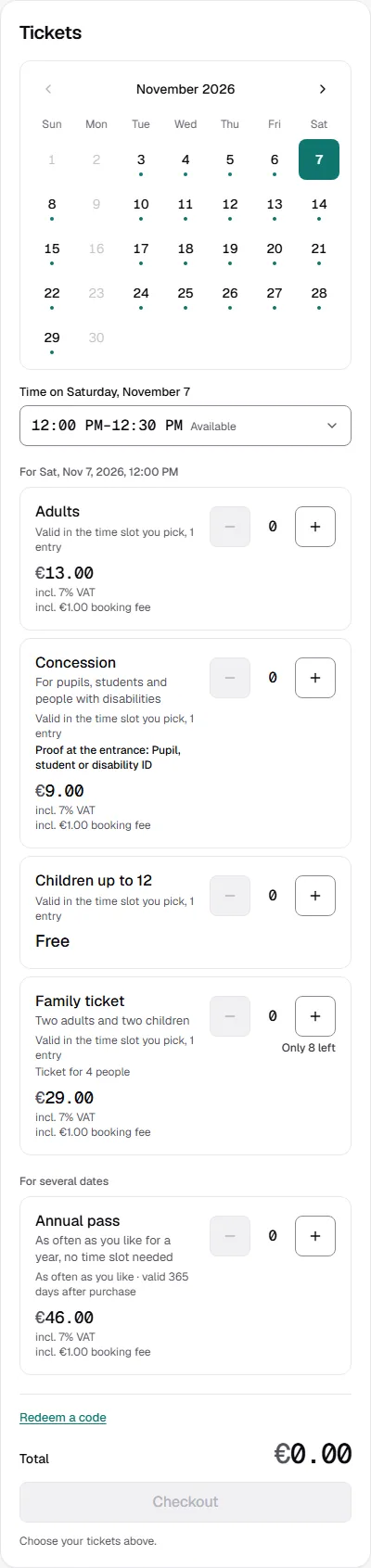
The ticket shows the time slot. When to arrive is shown in the shop to match the entry setting, such as "Please arrive within your time slot. Up to 15 minutes early is fine."
Common questions
Can an event have time slots and regular dates?
Yes. Add regular dates as usual with Add date; they then appear under Other dates.
What happens to booked slots if I change the opening hours?
They stay, even if they no longer fit the new schedule. If you don't need them, cancel them one by one. Slots whose orders were all cancelled disappear from the shop and open again once their time is back in the schedule. How buyers find out is covered in Changes to a date.
Can time slots be part of a season ticket?
No. A season ticket only includes regular dates, see Season tickets.