Integrations overview
How to connect TickySmart to your CRM, your accounting, your website or tools like Zapier, Make and n8n.
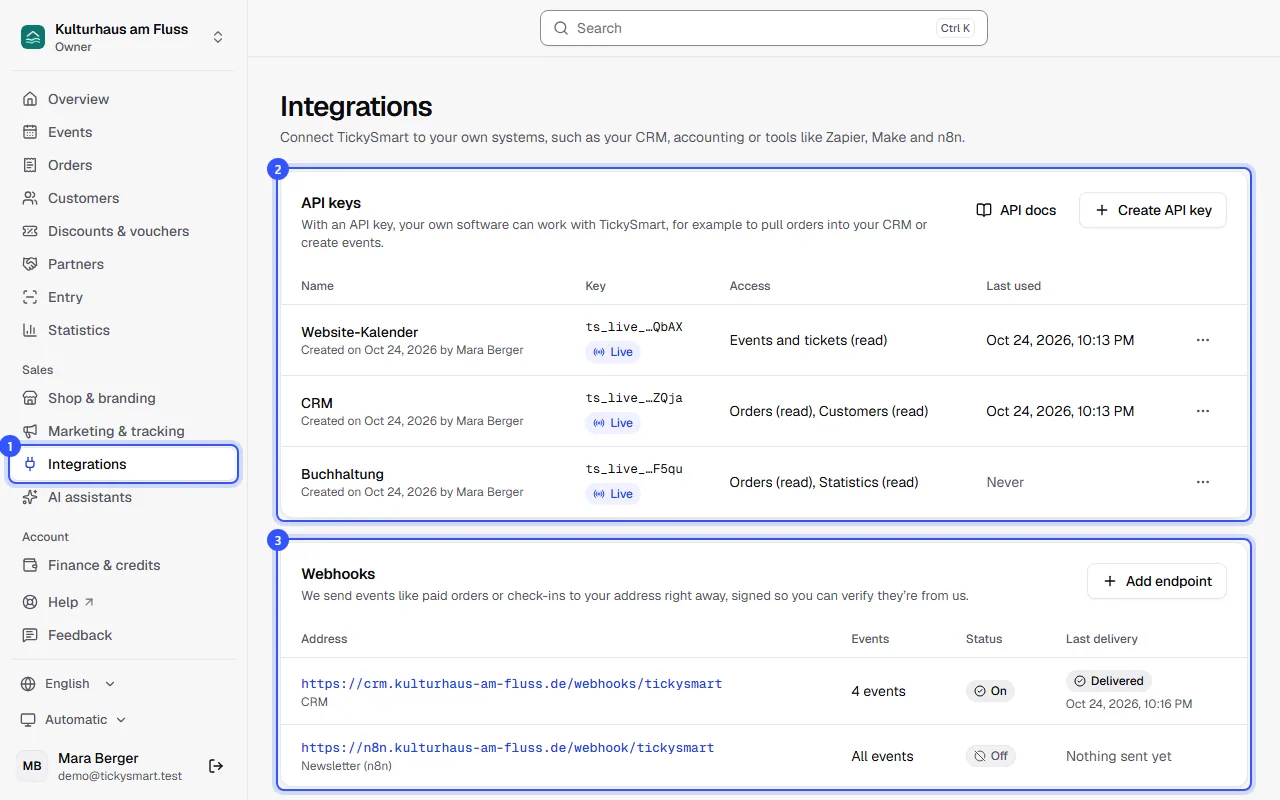
Under Integrations you connect TickySmart to your own systems. There are two ways to do this, and you can combine them: with an API key, your software asks us for data or changes something. With a webhook, we get in touch on our own as soon as something happens.
The Integrations page
- Open Integrations in the sidebar. Owners and admins can see this page.
- Under API keys, you create keys for the public API: Create and manage API keys.
- Under Webhooks, you add addresses that receive events: Set up webhooks.
What do you need for what?
| You want to … | How |
|---|---|
| Add new buyers to your CRM or newsletter tool | Webhook with Order paid. The order comes with the buyer's name and email address. |
| Get sales and refunds into your accounting | Webhook with Order paid, Order cancelled and Order refunded, or fetch regularly through the API with a key for Orders and Statistics |
| Show your events as a calendar on your website | API key with Events and tickets (Read), called from your server. Event published and Event changed tell you when something changes. |
| Feed a counter or display at the entrance | Webhook with Ticket checked in or extra redeemed |
| Create events from your own system | API key with Events and tickets (Read and write) |
All events are listed in Webhook events.
Zapier, Make and n8n
There's no ready-made TickySmart app in these tools. You can still connect them in a few steps, because all three can receive webhooks and send requests to an API:
- TickySmart should trigger something, like "new order → row in a spreadsheet": In the tool, create a trigger that receives webhooks. The tool gives you an address for it. Add that address as an endpoint in TickySmart, choose the events and send a test event so the tool learns what the data looks like.
- The tool should do or look up something in TickySmart: Use a step for HTTP requests and send the API key in the
Authorization: Bearer ts_live_…header. The address and fields you need are in the API reference.
Other connections
Some things aren't connected here but elsewhere in the dashboard:
- Payment providers such as Stripe, Mollie and PayPal under Settings → Payments: Connect a payment account.
- Your shop on your website, embedded and shared, under Shop & branding: Share your shop.
- Tracking and ad platforms such as Meta, TikTok and Google under Marketing & tracking.
- Data as a file, without any programming: Exports.
- AI assistants like Claude and ChatGPT under AI: Connect AI assistants.
Common questions
Do I need to know how to code?
Not necessarily for webhooks with Zapier, Make or n8n; those tools walk you through the steps. For your own software using the API, you need someone who works with APIs.
Can I connect several systems at the same time?
Yes. Create a separate API key or endpoint for each system. Then you can turn one off without affecting the others.
Is my data sent to other services automatically?
No. Through the Integrations page, data only goes out if you add an endpoint yourself or give software an API key. You can turn off, revoke or delete either at any time.