Changes to a date
What happens to orders and tickets when you reschedule or cancel a date or cancel a whole event, and which emails buyers get.
When you reschedule or cancel a date, every order with tickets for it is affected. You don't have to touch them one by one: tickets, refunds and emails are handled in one go. How to reschedule or cancel is explained under Reschedule or cancel a date and Cancel an event. This article covers what happens to the orders afterwards.
Date rescheduled
All tickets for the date stay valid, including passes that cover it. If you choose to inform buyers when rescheduling, each of them gets an email with the old and new date, your message and the tickets attached as a PDF.
- In the order, the date shows Rescheduled and when it was before.
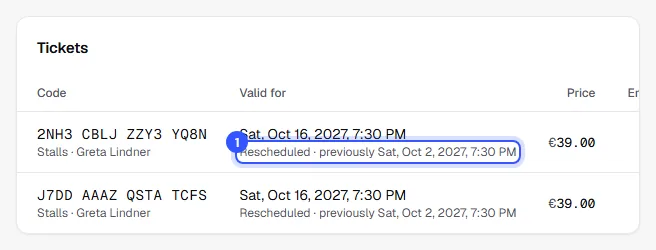
Buyers see the same note on their order page and on the event page in the shop. Passes saved in Apple Wallet and Google Wallet show the new date. This is what the email looks like:
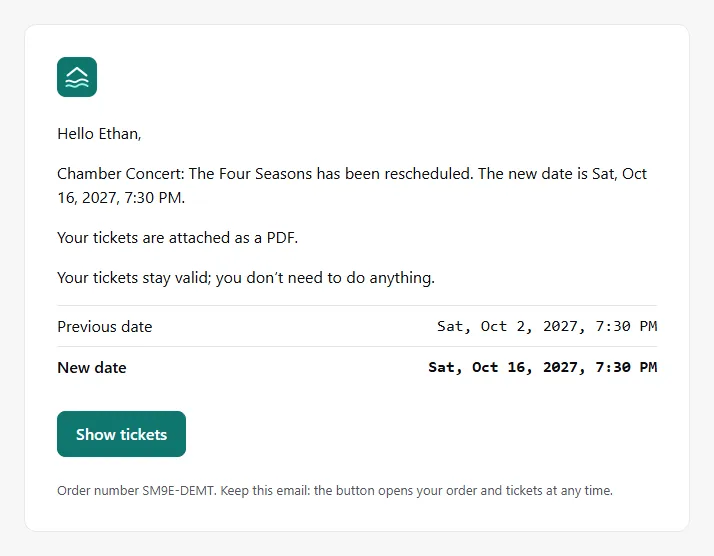
If someone can't make the new date, rebook their tickets to another date or cancel them with a refund: Change an order, Cancel and refund.
Date cancelled
When cancelling, you decide whether the tickets are refunded right away:
| Cancel and refund | Keep tickets |
|---|---|
| The tickets for the date are cancelled and refunded. The order shows the refund with the reason Date cancelled. | The tickets stay in the order until you rebook them to a replacement date or cancel them individually. |
| Buyers get an email saying their tickets are cancelled and how much goes back. | Buyers get an email saying the date is cancelled and that you'll be in touch. |
Either way, the ticket shows Date cancelled. Passes for several dates stay valid; their buyers learn about the cancellation by email and that their tickets still work for the other dates.
Event cancelled
If you cancel a whole event, the tickets for all dates are cancelled and refunded. They can't be kept here because cancelled events no longer work at the entrance. The refunds carry the reason Event cancelled.
Open bank transfers and late payments
- Orders still waiting for a bank transfer are cancelled with every cancellation. If you inform buyers, they get the email telling them not to transfer anything. If money arrives anyway, transfer it back.
- If a card payment only comes through after the cancellation, no tickets are issued and the money goes back automatically.
When you cancel with a refund, you always get the TickySmart fee for the refunded tickets back, whatever your billing model. Owner, Admin and Editor can reschedule and cancel dates. Cancelling with a refund also needs the permission to refund, which only Owner and Admin have.
Common questions
Can buyers cancel themselves after a date is rescheduled?
Only if your cancellation rules allow it. The deadlines then count from the new date. If you want to offer everyone a free cancellation, cancel their tickets in the order when they ask.
Do I have to include a message?
No, it's optional. But a sentence about the reason helps buyers, and it appears as written in every email. Write it in the language most of your buyers speak; the rest of the email comes in each buyer's language anyway.
Can I undo a cancellation?
No. A cancelled date can't be changed anymore. Add a new date instead. If you cancelled with Keep tickets, rebook the tickets to it.