Cancellation rules
Decide whether and until when buyers can cancel themselves, what it costs and whether they can resell tickets afterwards, for an event or single ticket types.
With cancellation rules, buyers cancel their tickets themselves on their order page, for free or for a fee, up to a deadline you set. The money goes back automatically and you don't have to do anything. Without cancellation rules, only your team can cancel.
Cancellation rules for an event
Open the event. In the Details area, the Prices card has a Cancellation rules section.
- Tick Buyers can cancel themselves.
- Set the steps: Until that many days before the start, the fee next to it applies, as a percentage of the ticket price or a fixed amount. Add step adds up to six steps. 0 days means until the start.
- If buyers should be able to return their ticket after the last deadline, tick Allow resale when cancellation is no longer possible and choose its fee: Resale.
- With Also refund the booking fee buyers also get the booking fee back; otherwise they get the ticket price minus the cancellation fee.
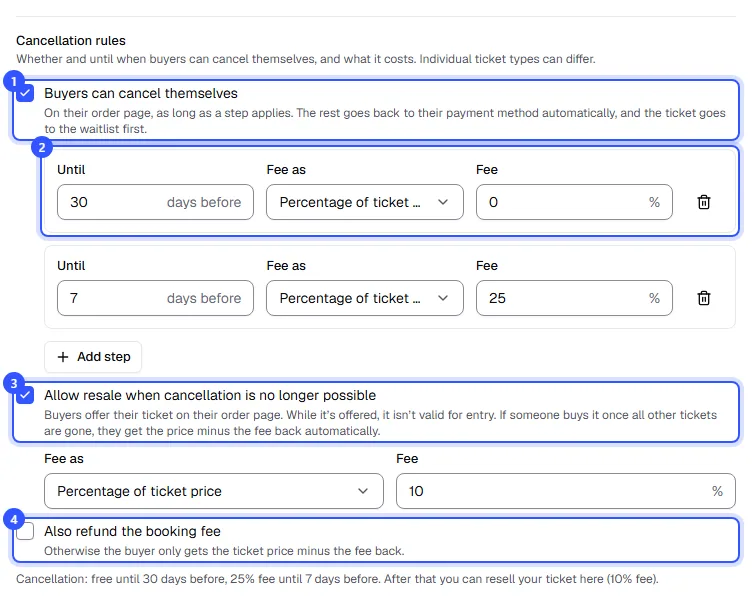
Below that, one sentence sums up what applies, just as buyers read it in the shop. Finally, click Save changes.
How the steps work
The step with the earliest deadline that hasn't passed yet always applies. An example with two steps for a concert on 18 September at 7:30 pm:
| Cancelled | Step | The buyer gets back |
|---|---|---|
| by 19 August, 7:30 pm | until 30 days before, free | the full ticket price |
| by 11 September, 7:30 pm | until 7 days before, 25% | 75% of the ticket price |
| after that | none left | nothing, only resale if allowed |
Deadlines count from the start of the date. For passes covering several dates, the first date the pass is valid for counts. A fixed amount is never more than the ticket price.
Different rules per ticket type
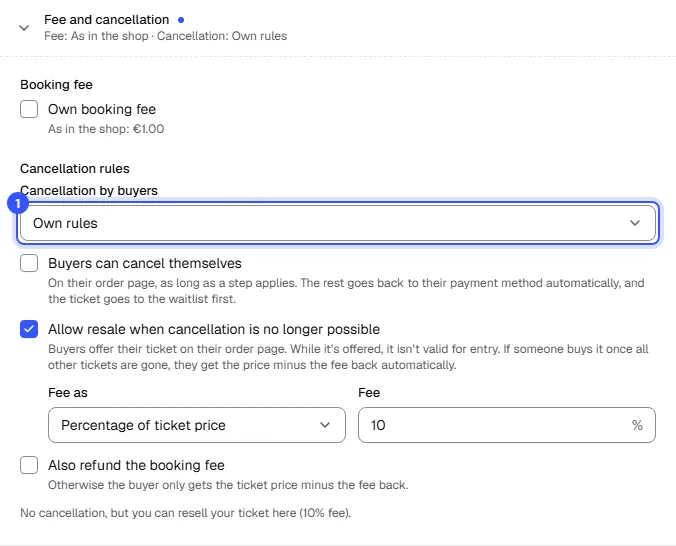
If something else should apply to one ticket type, say no cancellation for cheap early bird tickets, open the ticket type under Tickets with Edit. In the Fee and cancellation section, choose under Cancellation by buyers:
- Same as the event, Own rules with the same fields as on the event, or Not possible.
What buyers see
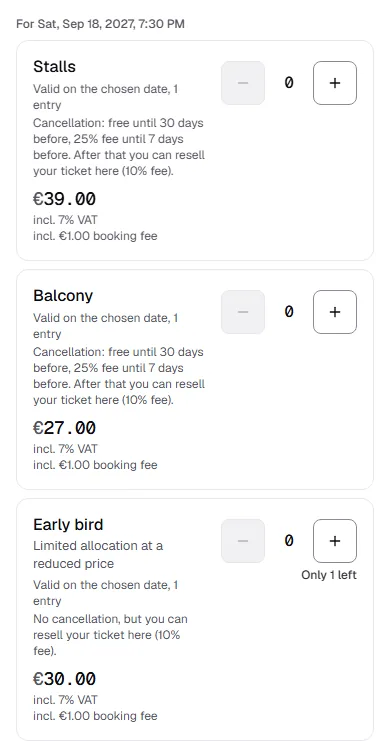
In the shop, every ticket type shows what applies when cancelling. After buying, buyers find the Cancel tickets section on their order page as long as a step applies: What buyers can do.
When a buyer cancels, the money goes back through the payment provider and they get an email. For bank transfer orders you transfer the money back yourself, and the refund shows as Transfer yourself on the order. The places go back on sale, to the waitlist first.
Common questions
Do changed rules also apply to people who already bought?
Every order remembers the rules shown in the shop at the time of purchase. When cancelling, the buyer gets whichever of the two is better for them: if you make the rules stricter, everyone who already bought keeps the old ones. If you make them more generous, that applies to them too. New buyers see and get the new rules.
Can my team cancel outside the rules?
Yes, any time in the order. There you can refund the amount under your cancellation rules, the full ticket price or an amount of your choice: Cancel and refund.
Which tickets can't buyers cancel themselves?
Tickets someone has already entered with, multi-entry tickets without a fixed date and season tickets. Required add-on tickets go with their main ticket. You cancel these in the order.
Who can change the cancellation rules?
Everyone who can edit events: Owner, Admin and Editor.