Webhook events
Which events there are, when they're triggered and what every delivery contains.
For each endpoint you choose which events it hears about. Every event brings the object it's about, such as the order, the event or the voucher, exactly as the API returns it. So there's nothing left to look up afterwards.
Choose events
When you add or edit an endpoint, the events are grouped by area, each with its type underneath. With All events, the endpoint gets all of them, including ones we add later. Pick individual events if your system only handles some of them.
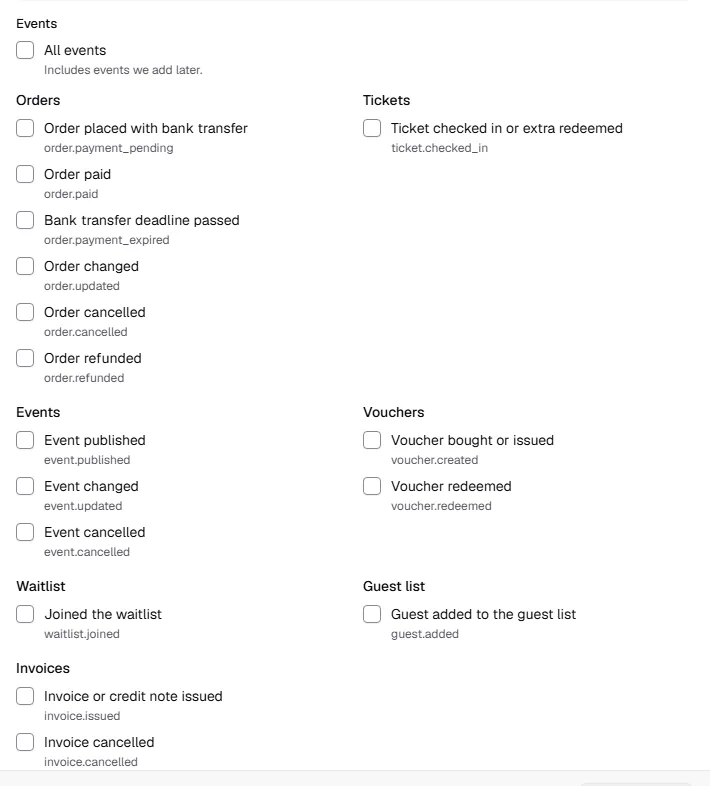
All events
| Event | Type | When |
|---|---|---|
| Order placed with bank transfer | order.payment_pending | Someone ordered with bank transfer. The order is waiting for the money and the tickets are reserved. |
| Order paid | order.paid | An order was paid or was free, and its tickets are issued. For bank transfer, it comes as soon as you confirm the payment. |
| Bank transfer deadline passed | order.payment_expired | A bank transfer order passed its deadline without payment. The tickets are back on sale. |
| Order changed | order.updated | An order changed: some tickets cancelled, rebooked, buyer details or a name on a ticket edited, tickets offered for resale or withdrawn, or a chargeback. |
| Order cancelled | order.cancelled | An order was cancelled completely, including an unpaid bank transfer order that you ended. |
| Order refunded | order.refunded | A refund is complete, partial ones too: at the payment provider or, for bank transfer, as soon as you tick it off in the order. |
| Ticket checked in or extra redeemed | ticket.checked_in | A ticket was accepted at the entrance or an extra was redeemed. Rejected scans don't trigger anything. |
| Event published | event.published | An event was published and is on sale. |
| Event changed | event.updated | A published event changed, including when a date was rescheduled or cancelled. |
| Event cancelled | event.cancelled | An event was cancelled. |
| Voucher bought or issued | voucher.created | A voucher was bought in the shop or issued in the dashboard. |
| Voucher redeemed | voucher.redeemed | Someone paid with a voucher. |
| Joined the waitlist | waitlist.joined | Someone confirmed their spot on a waitlist. |
| Guest added to the guest list | guest.added | Someone was put on a guest list and their free tickets are issued. |
| Invoice or credit note issued | invoice.issued | An invoice or credit note to a business customer was issued (kind). PDF and XML are ready to download. |
| Invoice cancelled | invoice.cancelled | An invoice was cancelled by a credit note, which you find in correctedBy. |
On top of these there's webhook.test, which you trigger with Send test event on the endpoint's page.
What a delivery contains
Every delivery is a POST request with JSON. The structure is always the same, shortened here:
{
  "id": "f3d4b95c-b569-400d-87e9-d38044e27f8d",
  "object": "event",
  "type": "order.paid",
  "createdAt": "2026-10-22T00:40:00.401Z",
  "apiVersion": "v1",
  "workspace": { "id": "8d59b98c-…", "slug": "kulturhaus-am-fluss" },
  "data": {
    "object": {
      "object": "order",
      "number": "W7NT-6U4X",
      "status": "paid",
      "total": 5800,
      "currency": "EUR",
      "customer": { "name": "Katharina Lehmann", … },
      …
    }
  }
}
| Field | Meaning |
|---|---|
id | Unique ID of the event. It stays the same on a retry, which is how you spot duplicate deliveries. |
type | The event, e.g. order.paid |
createdAt | When the event happened |
workspace | The workspace it comes from. Handy if one endpoint receives events from several workspaces. |
data.object | The object as the API returns it, including buyers' names and email addresses |
What's in data.object depends on the event:
| Events | Object (data.object.object) |
|---|---|
order.* | order: the order with its lines, tickets, amounts and buyer |
event.* | event: the event with its dates and ticket types |
ticket.checked_in | check_in: the scan with ticket, order number, area and device |
voucher.* | voucher: the voucher |
waitlist.joined | waitlist_entry: the waitlist entry |
guest.added | guest: the guest on the guest list |
invoice.* | invoice: the invoice or credit note with recipient, lines and amounts |
All fields and their types are in the API reference under "Webhooks".
Every request also carries these headers:
| Header | Content |
|---|---|
TickySmart-Signature | The signature to check, see Secure your webhooks |
TickySmart-Event-Id | Same as id in the body |
TickySmart-Event-Type | Same as type in the body |
TickySmart-Delivery-Id | ID of this delivery, as in the delivery log |
User-Agent | TickySmart-Webhooks/1.0 |
Good to know
- Order: Events can arrive in a different order than they happened, especially after retries. Compare
createdAtif you need to. - State of the object:
data.objectshows the state at the moment we sent the event, a few seconds after the change. A retry sends the same content again. If you need the latest state, fetch the object through the API. - New fields: We add fields and events without changing the version. Ignore anything your system doesn't recognise.
Common questions
Which event do I need for new buyers in my CRM?
order.paid. It arrives for every completed order, free ones included, and brings the buyer's name and email address. There's no separate event for customers.
Why does bank transfer send order.payment_pending first and order.paid later?
With bank transfer, the order is only reserved at first. order.paid comes once you confirm the payment in the dashboard. If no money arrives, order.payment_expired follows when the deadline passes.
Do I get order.refunded for a partial refund?
Yes. If someone cancels some of their tickets, order.updated comes first. As soon as the money is back, order.refunded follows, once per refund. What's already been refunded is in the order under refunds and refunded.