Create an account
Sign up, confirm your email address and get started. One account works for as many organizers as you like.
Your account is your personal login to TickySmart. It belongs to you, not to your organizer: if you work for several organizers, you use the same account everywhere.
Sign up
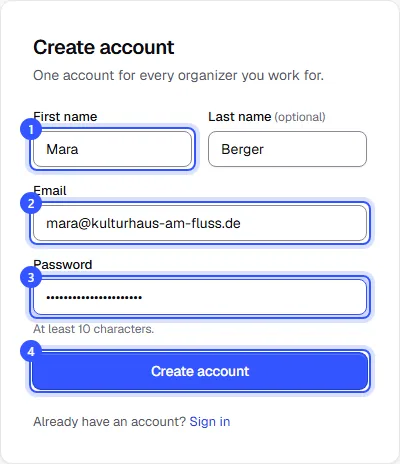
Open the sign-up page at app.tickysmart.io/signup and fill in the form:
- First and last name. Your team sees this name, for example next to changes to orders.
- Your email address. You use it to log in and receive important notices.
- A password with at least 10 characters.
- Click Create account.
Confirm your email address
We send you an email with a link right away. Open it, your account is active and you go straight on to your workspace.
Quick start from the website
On tickysmart.io, your email address is all you need: enter it in the field and click "Start for free". Your account exists right away, and you get an email with the Activate account button.
- Open the link in the email. This logs you in.
- On the Welcome to TickySmart page, enter your first and last name and set a password with at least 10 characters.
- Click Continue. Then create your workspace, just like after the regular sign-up.
If you don't activate your account, we remind you once after two days. After 30 days without activation, we delete the account and the address automatically.
You were invited?
If someone invited you to their team, open the link in the invitation and create your account with exactly the address the invitation was sent to. You'll land in the right workspace straight away.
Common questions
I don't get an email
Check your spam folder. On the Confirm your email page you can request it again with Send email again. If you mistyped your address, choose Sign up again.
I signed up on the website and have no password
Open the link in the email Your TickySmart account is ready, that's where you set your password. If you can't find the email, click Forgot password on the login page. The link in that email lets you set your first password too.
Can I change my email address later?
Not at the moment. You log in with this address, so it's fixed in your account. If you need a different one, create a new account with it and ask to be invited to the workspaces you work for.
Do I have to set up two-factor authentication?
No, it's optional, but we recommend it. The dashboard offers it after your first workspace: Two-factor sign-in.
Next step
Now create your workspace: Create a workspace.