Change an order
Correct the buyer's name or email address and move tickets to another date of the same event.
After a purchase you can change two things on an order: the buyer's details, for example after a typo in the email address, and the date the tickets are valid for. You'll find both in the order under More actions. Owner, Admin and Customer service can make changes.
Edit the buyer
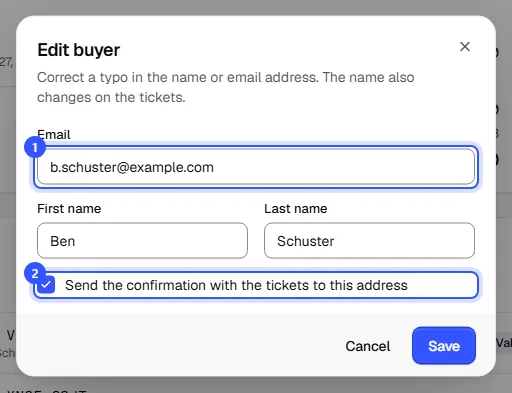
- Open the order and choose Edit buyer under More actions. Correct the Email, First name or Last name.
- Tick Send the confirmation with the tickets to this address if the tickets should go to the new address. Then click Save.
Rebook to another date
If a buyer can't make it, you can swap their tickets for another date of the same event. This works for tickets valid for one specific date, not for passes covering several dates.
- Choose Rebook to another date under More actions. All tickets are selected. Untick the ones that should stay where they are.
- Pick the New date. You can only choose upcoming scheduled dates that all selected ticket types are valid for.
- Leave Inform the buyer by email ticked and add a message if you like. Click the rebook button.
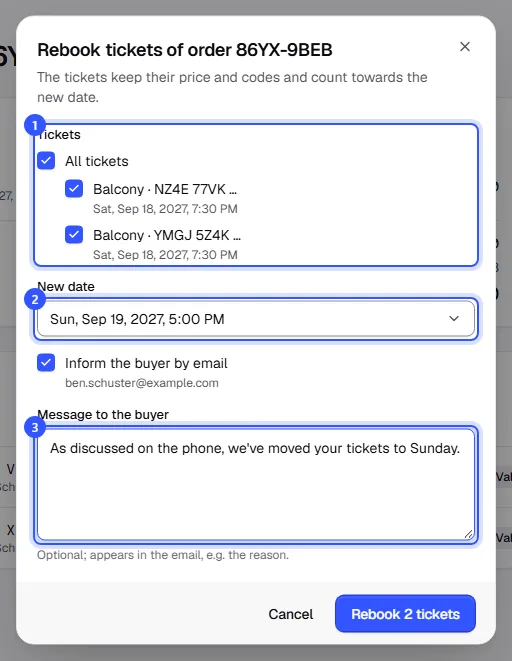
The tickets keep their price and codes and count towards the new date. They then count towards the quota and capacity of the new date. If there isn't enough room left, the dashboard refuses the rebooking. Tickets with a seat from the seat map keep their seat, so it has to be free on the new date.
The buyer gets an email with the old and new date and the tickets attached as a PDF. If they saved them in Apple Wallet or Google Wallet, the passes show the new date afterwards.
Common questions
Can I change the ticket type, say from standing to seated?
No. Cancel the tickets with a refund and let the buyer order again: Cancel and refund.
Can I add tickets to an order?
No. The buyer buys more tickets as a new order in the shop.
The new date costs more or less
When you rebook, the price paid stays the same. Nothing is charged extra and nothing is refunded.
I can't find the option to rebook
Rebooking only works for paid orders with valid tickets for one specific date. If there's no other suitable date, the dialog tells you so. If lots of buyers need to move because the date itself is changing, reschedule the date instead: Changes to a date.
Can buyers change their details themselves?
The names on the tickets, yes, if the ticket type uses names on tickets. They can only change their email address in the checkout before paying. After that, you correct it here.