Find orders
Search all orders from your shop, filter by order date, event, date and status, and export the list.
Orders lists every order from your shop and from the widget on your website, newest first. Without a filter you see paid orders. Click an order number to open the order details.
Search and filter
- Search: Type the start of an order number, a name or an email address. The list updates as you type.
- Order date: Pick a period, for example the last 7 days. Days follow your workspace's time zone.
- Status: Show only cancelled orders, for example, or the ones still waiting for a bank transfer. All statuses shows everything.
- Export: Download the filtered list.
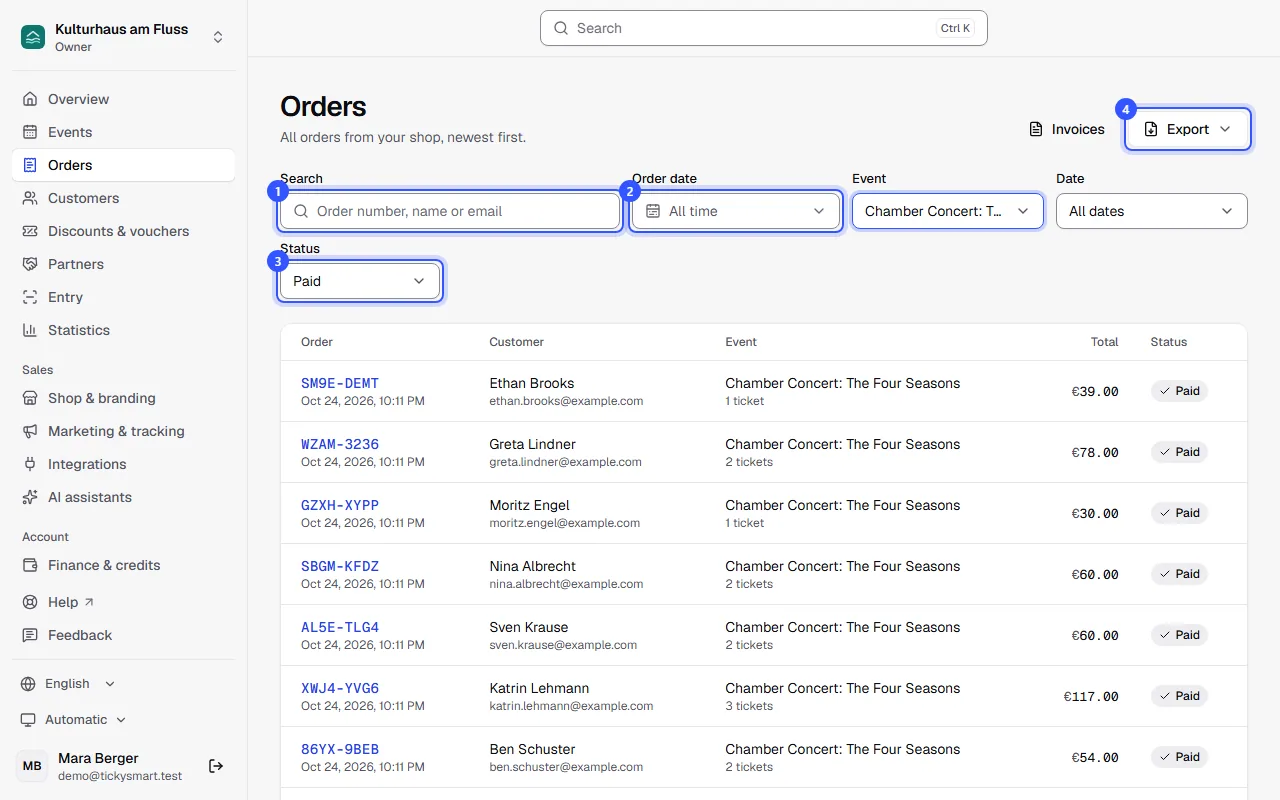
Event narrows the list down to one event. If the event has several dates, a Date filter appears next to it. The filters are part of the page address, so you can bookmark a view or send the link to your team. At the end of the list, Load more loads older orders.
What the status means
| Status | Meaning |
|---|---|
| Reserved | The buyer is in the checkout right now. The tickets are held for 10 minutes, or until the deadline of a waitlist offer. |
| Awaiting transfer | Ordered by bank transfer, payment not confirmed yet: Bank transfer |
| Paid | Paid, tickets sent. The order stays paid even if some of its tickets are cancelled. |
| Expired | The reservation or the payment deadline ran out without payment. The tickets are back on sale. |
| Released | The buyer changed their selection or declined a waitlist offer, or you cancelled an unpaid bank transfer order. |
| Cancelled | All tickets of the order are cancelled: Cancel and refund |
Export the list
Export gives you the orders (one row per order) or the attendee list (one row per ticket, with check-in), as Excel or CSV. The export uses your filters for order date, event, date and status, but not the search. More under Exports.
Common questions
An order is missing from the list
Check the Status filter: without a choice, the list only shows paid orders. Set it to All statuses. Free tickets from the guest list aren't listed here but on the event under Guest list: Guest list.
Why are names and email addresses shortened?
Your role shows customer data in shortened form. With such a role you can only search by order number. Owners and admins decide who has which role: Roles and permissions.
Can I search for a ticket code?
No, the search covers order number, name and email. The codes of all tickets are in the attendee list you download under Export.
Is there a quicker way to an order?
Yes. The search at the top of the dashboard (Ctrl K, or ⌘ K on a Mac) finds orders by number, name or email, whatever their status.
Why does an order have no event?
If the Event column says Vouchers, someone bought vouchers. You open and cancel these orders like any other: Vouchers.