Waiting room
When a rush is expected at the start of sales, line buyers up fairly in a queue and let them into the checkout a few at a time.
Expecting lots of buyers at once when sales open, say for a concert that will sell out in minutes? Then turn on the waiting room. From the start time, buyers line up in a queue and get into the checkout a few at a time. Nothing crashes, and nobody has to keep reloading.
Turn on the waiting room
The waiting room is in Tickets, below the ticket types.
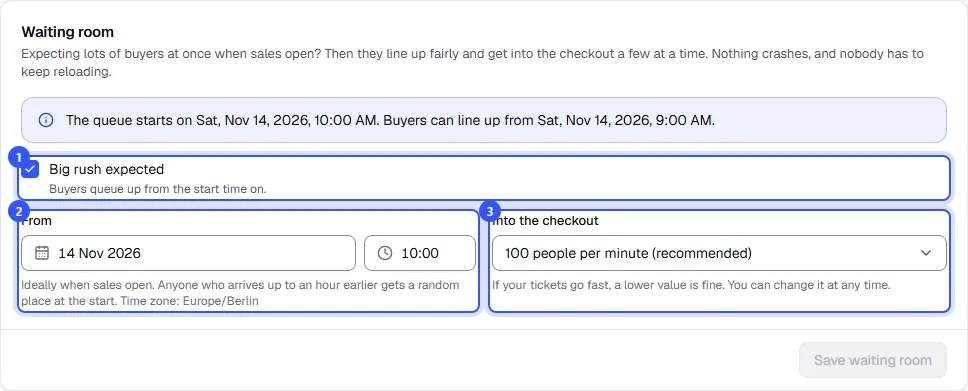
- Tick Big rush expected.
- From: ideally when sales open. It's preset to the earliest upcoming sales start of your ticket types. The time is in the event's time zone.
- Into the checkout: how many people per minute get into the checkout, between 25 and 1,000. 100 is recommended. If your tickets go fast, a lower value is fine.
Click Save waiting room. The top of the card then shows when the queue starts and from when people can line up.
How it works for buyers
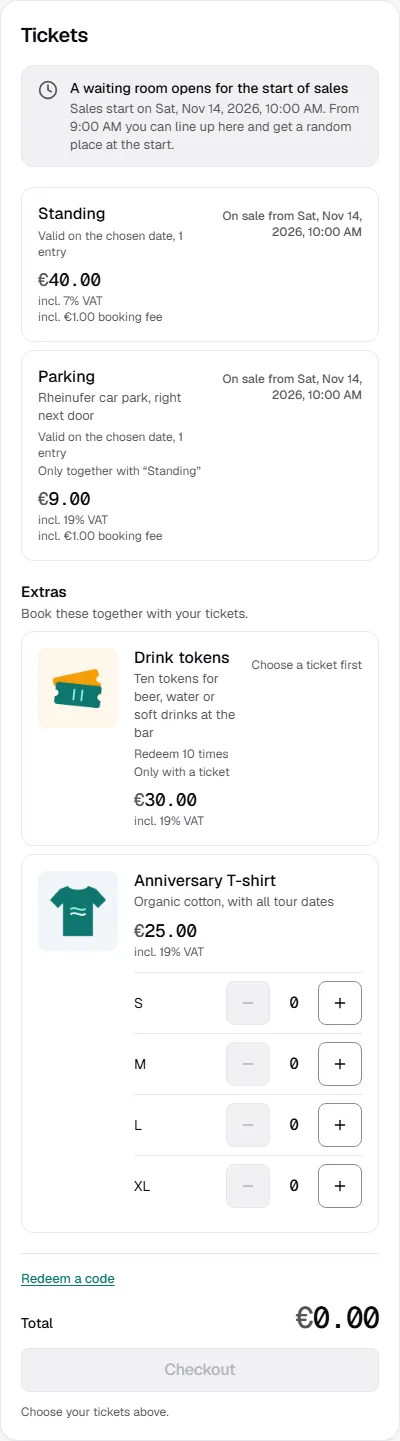
- Before the start: the tickets show a note that a waiting room opens when sales start, and from when people can line up.
- Up to an hour before: anyone who comes to the page is in the waiting room. At the start, everyone who's there by then gets a random place in the queue, so arriving early doesn't help.
- From the start: newcomers join the back of the queue. Buyers see their position, how many people are ahead and roughly how long it will take. Reloading is fine; their place stays.
- Their turn: the buyer has 15 minutes to put tickets in the basket. If the time runs out, they join the queue again.
Buyers who don't want to keep the page open can enter their email address and get an email as soon as it's their turn. We only use the address for that one email. If the shop is embedded on your website, the waiting room opens in a new tab.
While the queue is running
From the start, the card shows the current state: In the queue, Already let in and how long it will take at the current rate until everyone is through.
- You can change the rate at any time and it applies right away. The start time can't be moved anymore.
- If nobody is waiting, new buyers go straight through.
- End waiting room ends the waiting room. From then on everyone goes straight to the checkout, and anyone still waiting is let in at once.
As long as it isn't running yet, you can turn the waiting room off again with the checkbox.
Common questions
Which rate should I choose?
Think about how many orders you expect in the first few minutes. At 100 people per minute, 1,000 buyers reach the checkout in ten minutes. For an event with 400 places, less is enough. You can adjust it while the queue is running.
Do I also need a sales start on the ticket types?
Yes, ideally. Otherwise buyers can buy as usual before the waiting room starts. Set Sales start on the ticket types to the same time, see Sales period and limits.
Does the waiting room apply to secret links too?
Yes. From the start, all buyers of the event go through the queue, including those with a secret link.