Emails to buyers
Which emails your buyers get automatically, in which language and in your name, and what you control yourself.
Your buyers get their emails automatically: the confirmation with the tickets, notices when something changes and a reminder before the event. The emails come in your name, with your logo and colour, and in the language the buyer used in the shop.
The confirmation
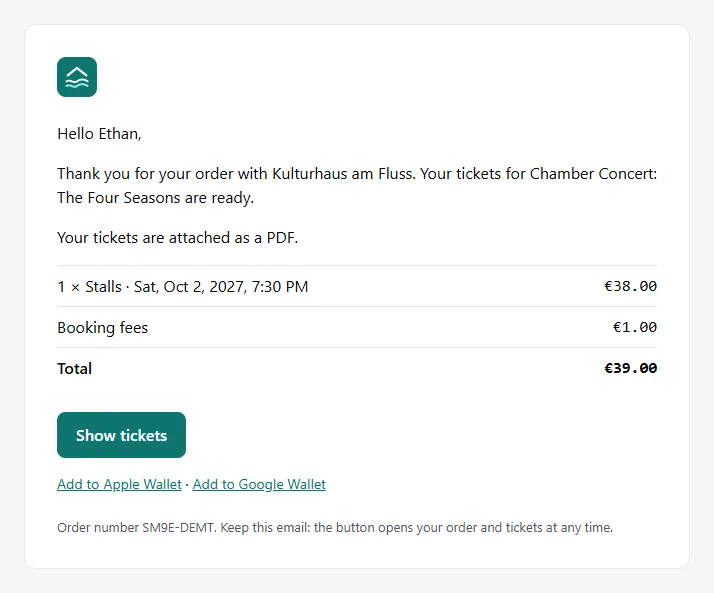
After paying, the buyer gets the confirmation with all lines and the total. The tickets are attached as a PDF. The button opens their order page, and below it they can save the tickets to Apple Wallet or Google Wallet.
All emails at a glance
| When it's sent | |
|---|---|
| Confirmation with tickets | after payment, for bank transfer after you confirm it |
| Bank transfer | after the order with the bank details, as a reminder before the payment deadline, when it expires and when you cancel the order: Bank transfer |
| Cancellation | when the buyer cancels, when you cancel and choose to inform them, and when a ticket has been resold, each with the refund and any fee kept |
| New date | when you reschedule the date or rebook the tickets and choose to inform the buyer, with the tickets as a PDF: Changes to a date |
| Date or event cancelled | when you cancel without a refund, and to buyers of passes that stay valid |
| Reminder | 24 hours before the start, with time, doors, venue and a link to the tickets |
| Waitlist | to confirm the spot and when tickets become available: Waitlist |
| Waiting room | when it's the buyer's turn, if they asked for the email in the waiting room: Waiting room |
| Guest list | with the free tickets: Guest list |
| Vouchers | after the purchase, with the vouchers as a PDF: Vouchers |
| My tickets | with the sign-in link, when the buyer requests it in the shop |
What you control
- Sender and look: Name, logo and colour come from your shop design.
- Language: Emails are sent in the language the buyer ordered in. Your own texts, such as the event title and ticket type names, appear in that language if you've added it, otherwise in your shop's default language: Languages.
- Personal message: When you cancel, rebook, reschedule or call off a date, you can add a message. It appears in the email as written.
- Reminder: Under Settings → Notifications you can turn off Reminder before the event: Notifications.
The rest of the email text is fixed. That way it's correct in every language and always matches what's in the order.
Common questions
A buyer didn't get their email
Resend the confirmation or download the PDF: Resend tickets.
Which language does a buyer get their emails in?
The language they had set in the shop when they ordered. The order shows it under Language.
Do I get emails about orders too?
Yes, if you want: for every new order, as a daily summary and when a date is almost sold out. You set this up under Notifications.