Create your first event
Create an event with a title and venue, add a date and set up your first ticket type with a price and quota.
An event is what you sell: a concert, a reading, a festival. Every event has one or more dates and one or more ticket types. To start, a title, a venue, one date and one ticket type are enough.
Create the event
- Open Events and click Create event. Enter the title. It's required in your shop's default language; add more languages using the language codes on the right.
- Pick a saved venue or Set venue later. You save venues under Settings → Venues; a one-off address goes directly on the event later.
- Click Create event.
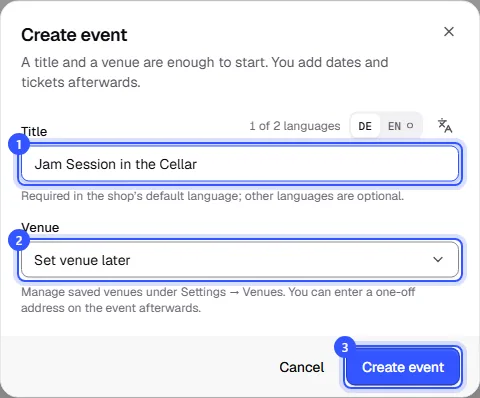
Your event is now a Draft. Buyers can't see it yet, so you can prepare everything in peace. Cover image, description and venue are in the Details section.
Add a date
Open the Dates section and click Add date.
| Field | Note |
|---|---|
| Start | Date and time, required |
| Doors open | When doors open, optional. Buyers see it in the shop. |
| End | Optional |
| Capacity | How many guests fit on this date, across all ticket types. Empty: only the ticket types' quotas count. |
You enter all times in the event's local time; the dialog shows which time zone applies.
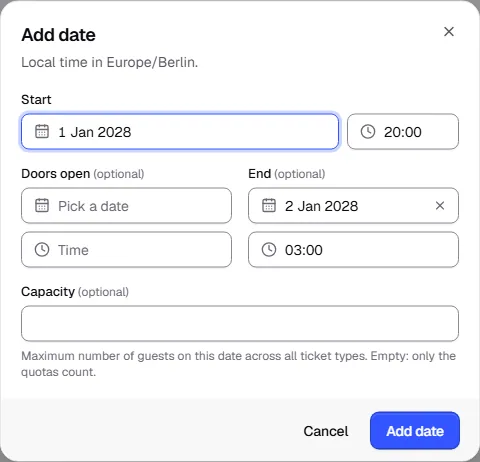
If your event has several dates, just add more.
Add a ticket type
Open the Tickets section and click Add ticket type. Enter a name, such as "Early bird", "Regular" or "Concession". Then:
- Price: Below the field you see whether the price is gross or net and which tax rate applies. That depends on your workspace's country.
- Quota per date: How many tickets of this type there are per date. Empty means unlimited; then only the date's capacity counts.
Finally, click Add ticket type.
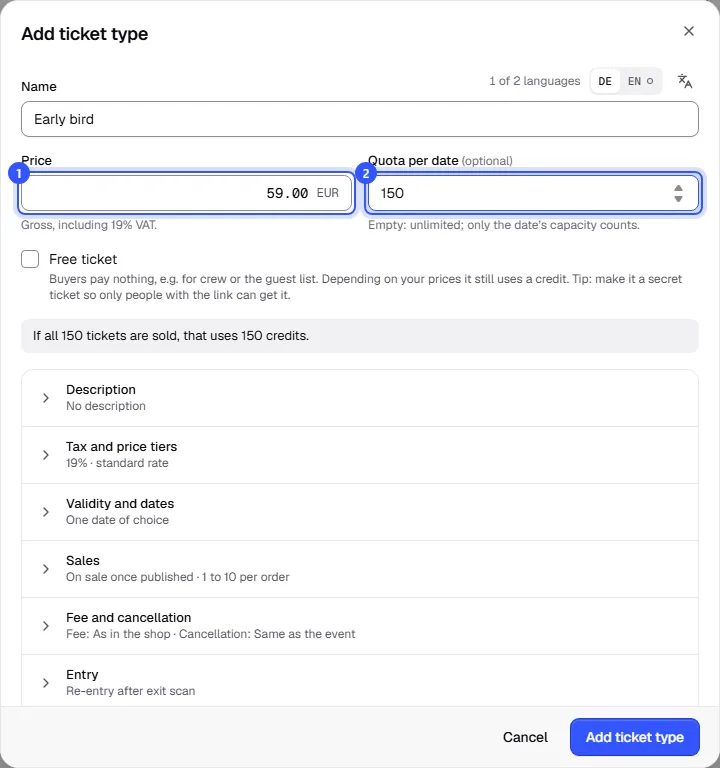
The sections below, such as Validity and dates or Sales, come with sensible defaults. You can adjust them any time. With Free ticket you give tickets away for free, for example for the guest list.
What's next?
Once the date and ticket type are in place, you can publish the event: Publish an event.
Common questions
Can I use an event as a template?
Yes. Open the event and choose Duplicate under More actions. There you can also have it repeat, for example every Thursday. Each copy is then an event of its own that you can change separately.
What's the difference between capacity and quota?
Capacity applies to the whole date, for example 300 seats in the hall. A quota applies to one ticket type, for example 50 early bird tickets. The tighter limit always wins.