Find tickets and let guests in by hand
Find guests without a scannable ticket in the scan app by name, order number or ticket code, and let them in.
A flat battery, a cracked screen over the QR code, or a guest who's only on the guest list: staff then look up the ticket in the scan app and let the guest in from there. The same rules apply as when scanning.
Find a ticket
Tap Search at the bottom of the scan app.
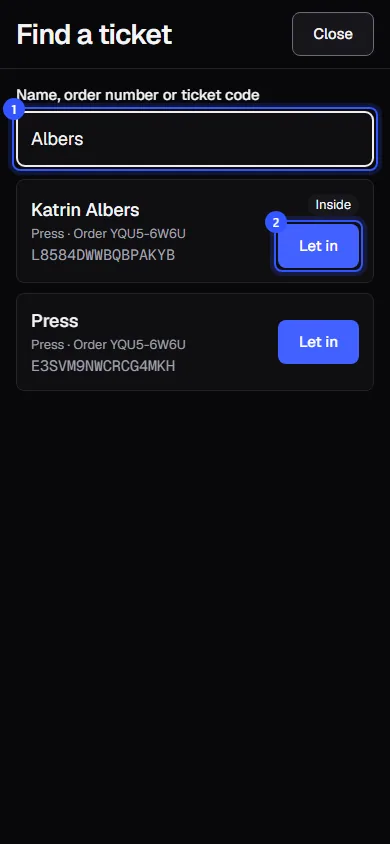
- Under Name, order number or ticket code, enter at least two characters, for example the last name. Search finds the name on the ticket and the buyer's name, plus order numbers and ticket codes from the beginning.
- Tap Let in next to the right ticket.
The app then shows the result just like after a scan, in green, yellow or red: Scan results.
Each result shows the name on the ticket (or the ticket type if there's no name on it), the ticket type, the seat for seated events, the order number and the ticket code. Inside means the ticket is currently let in. Search shows at most 25 results, so type more of the name if there are many.
Direction and counters
The button next to each result follows the setting at the bottom of the app:
| Setting | Button |
|---|---|
| In | Let in |
| Out | Let out |
| At a counter | Redeem |
Offline
Without a connection, the app searches the tickets saved on the device and says so above the results: No connection: searching the tickets saved on this device. More in Scanning offline.
Common questions
Can I see later that someone was let in using search?
Yes. In the live view, these scans show Via search.
How do I know the person in front of me really holds the ticket?
Ask to see the order confirmation, or ask for the email address or order number. If names are on the tickets, a look at their ID helps. See Names, proof and photos.
A guest on the guest list has no ticket
Search for their name. Guests without an email address still have a ticket, they just didn't get it by email: Guest list.