Delete your workspace
Permanently delete a workspace with all its events, orders and customer data, what needs to be settled first and how to cancel the deletion.
If you no longer need a workspace, its owner can delete it along with everything in it. So that nothing disappears by accident, we only delete it after 24 hours. Until then, the deletion can be cancelled.
Request the deletion
- Open Settings → General and click Delete workspace at the very bottom. Only the owner sees this section.

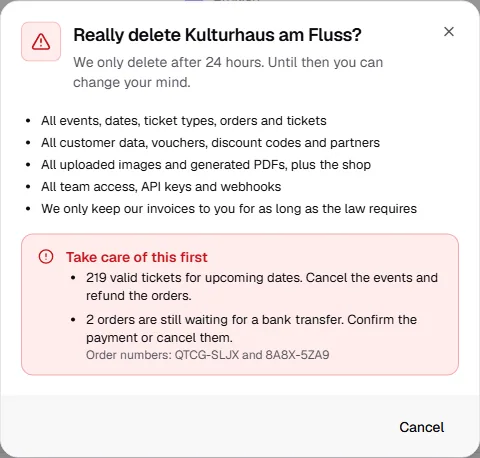
- Read what will be deleted. If it says Take care of this first below, settle those points first, see below.
- Tick I understand: once the 24 hours are up, everything is gone for good. and click Continue.
- Type your workspace's short name to confirm and click Request deletion.
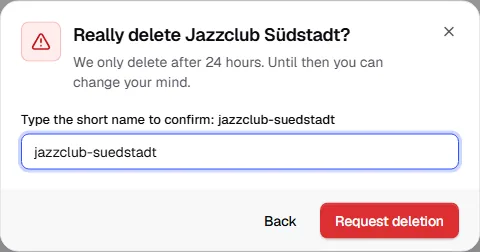
All owners get an email saying the deletion has been requested and when it will happen.
What gets deleted:
- All events, dates, ticket types, orders and tickets
- All customer data, vouchers, discount codes and partners
- All uploaded images and generated PDFs, plus the shop
- All team access, API keys and webhooks
We only keep our invoices to you for as long as the law requires.
What needs to be settled first
As long as something is still open, the workspace can't be deleted. The dialog tells you exactly what's missing.
| What's open | What to do |
|---|---|
| Valid tickets for upcoming dates | Cancel the events and refund the orders: Cancel an event |
| Refunds still in progress | Wait until they've gone through. |
| Bank transfer refunds still open | Transfer the money back and mark them as done in the order: Bank transfer |
| Orders still waiting for a bank transfer | Confirm the payment or cancel them: Bank transfer |
| Open TickySmart invoices | Pay them under Finance & credits. |
| Credits below zero | Buy credits until the deficit is made up: Credits |
| A payout of earlier credit still in progress | Wait until it's complete. |
| An active flat rate | Cancel it; it ends when the minimum term is over: Cancel the flat rate |
Available credits expire with the workspace. They can't be paid out.
Open pay-as-you-go fees
Whatever has added up for pay as you go since the last invoice, we invoice right away when you request the deletion and charge it to your payment method. The dialog shows you the amount beforehand. If it's below the smallest amount we can charge (€0.50 in euros), we waive it.
With a card this happens immediately and the deletion is requested. A direct debit takes a few days: once the payment has arrived, request the deletion again. If the charge fails, pay the invoice under Finance & credits.
During the 24 hours
The workspace is locked, and so is the shop. Anyone opening it in the dashboard only sees when it will be deleted. The owner can bring it back with Cancel deletion, and everything is as before. All owners get an email then too.
Once the period is over, we delete the workspace for good. Team members' accounts remain; only their access to this workspace disappears.
Common questions
Can admins delete a workspace?
No, only owners, and only with their own account.
What happens to my account?
It stays, and so do your other workspaces. If you want to delete your account too, you can do that under Your account once you're no longer an owner anywhere.
I just want to take a break
Then don't delete the workspace. Without published events it doesn't sell anything, and your data and settings are kept for next season. Only a flat rate keeps running. Switch it under Finance & credits if needed.