Taxes
How TickySmart calculates and shows tax on tickets and fees, which countries have templates, and how the TickySmart fee is taxed.
You sell your tickets yourself, so the tax on them is yours to pay too. TickySmart calculates it for every order and shows it to buyers correctly. As the seller, you decide which rate applies. We don’t give tax advice.
What you set
| Setting | Where | More |
|---|---|---|
| Tax rate per ticket type | Ticket type, Tax and price tiers section | Price tiers and tax |
| Tax rate per extra | Extra, its own rate | Extras |
| Prices with or without tax | Event, Prices card, Prices include tax (gross) | Price tiers and tax |
| No VAT at all | Settings, General, Sell without VAT | Selling without VAT |
The rates you can choose come from a template for your workspace's country, such as the standard rate and reduced rates. New ticket types get your usual rate, which you choose under Settings → General at Usual tax rate for tickets; without a choice of your own, the first rate in the list. Whether new events include tax in their prices also depends on the country.
Selling without VAT
If you don't charge VAT, for example as a small business, a private person or a club that isn't VAT-registered, you set this once for the whole workspace:
- Open Settings, General section.
- Turn on Sell without VAT.
- Click Save changes.
From then on:
- All ticket types and extras have 0%. Prices stay as they are and are final prices.
- When you create tickets and extras, there's no tax rate to choose. The gross or net setting on the event goes away.
- The shop, checkout and order show no tax.
- Earlier orders keep their tax.
If you later have to charge VAT, for example because you go over the small business threshold, turn the setting off again. Your ticket types and extras then stay at 0% until you choose a tax rate for each one.
If you issue invoices to business customers, enter why no tax applies in the settings under Invoices at Note for tickets without tax. The note then appears on every invoice.
How we calculate
- We calculate tax per rate on the total of all items with that rate, not per ticket. That way there are no rounding differences.
- The booking fee belongs to the ticket and uses its tax rate: Booking fee.
- With tax-inclusive prices, the tax is part of the price. With tax-exclusive prices, it's added at checkout, so the buyer pays more than the price shown.
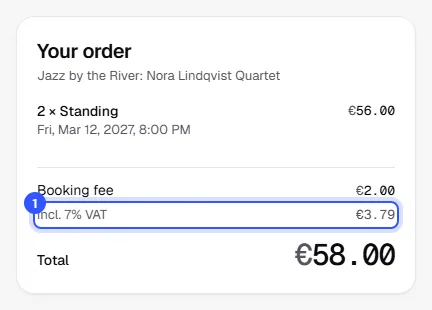
In the shop, the rate already appears under every ticket price. At checkout and on the order page in the shop, buyers then see:
- A separate line with the amount for each tax rate, for example "incl. 7% VAT" for tax-inclusive prices or "plus 8% tax" for tax-exclusive ones. If tickets in an order have different rates, there are several lines.
Country templates
There are templates for every EU country, Switzerland, Liechtenstein, the United Kingdom, Norway and Iceland, Canada, the US, Mexico, Australia and New Zealand.
| Region | What applies |
|---|---|
| Europe and most other countries | Tax-inclusive prices, rates from the country's template |
| Canada | Tax-exclusive prices, a choice of rates by province |
| US | Tax-exclusive prices. Sales tax depends on the state and city, so enter the rate as Other rate. |
If a rate is missing from the template, you can always use Other rate with up to three decimals.
Tax on the TickySmart fee
Our fees are net amounts. Invoices for credit purchases, pay as you go and the flat rate add VAT or sales tax where it applies. That depends on your country and your billing details, meaning your billing address and VAT number. You enter both with Stripe when you add a payment method or pay: Invoices.
For example, if you buy 2,000 credits at €0.23 each, you get 2,000 credits, and the invoice is for €460 plus tax where it applies.
Common questions
Which tax rate applies to my event?
That depends on the country and the type of event. We don't give tax advice. If in doubt, ask your tax advisor and then set the rate on the ticket type.
Can I mix tax-inclusive and tax-exclusive prices in one event?
No. That setting applies to all ticket types and extras of an event. Different tax rates within one event are fine, though.
Does the price change if I switch an event to tax-exclusive?
The amount you entered stays the same, and tax is then added at checkout. Buyers pay more as a result. Adjust your prices if the final price should stay the same.
Where do I find the tax for my bookkeeping?
The order export has a tax column, and the order details show the amount per rate.