Create a workspace
Create a workspace for your organization, with a short name for your shop address, country, currency, language and time zone.
A workspace is your organization in TickySmart. It holds your events, your ticket shop, your payment accounts and your team. Whoever creates a workspace becomes its owner and can do everything.
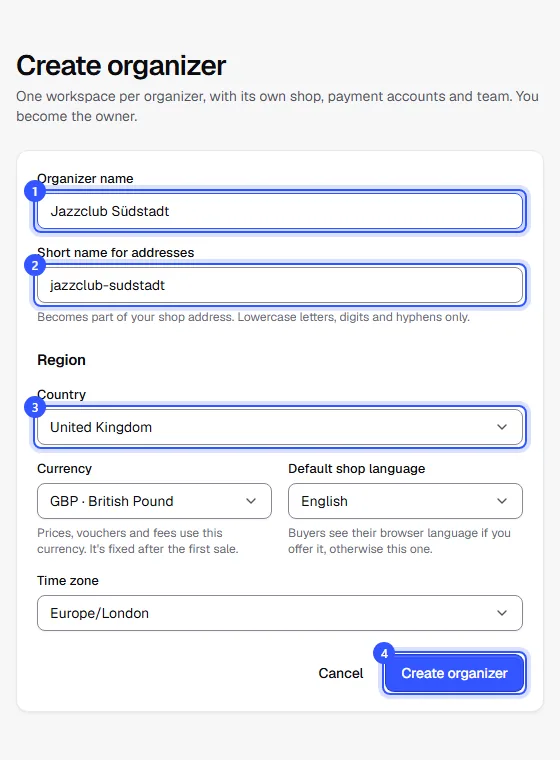
Create the workspace
Once you've confirmed your email address, the Create organizer page opens by itself. Later you'll find it at the top left in the workspace switcher under Create a new organizer.
- Organizer name: This is how your organization appears in the shop, on tickets and in emails to your buyers.
- Short name for addresses: We suggest one based on the name. It becomes part of your shop address, for example shop.tickysmart.io/kulturhaus-am-fluss. Lowercase letters, digits and hyphens, 3 to 48 characters.
- Country: Tax rates and legal notices in the shop depend on it. We fill in a matching currency, language and time zone, which you can change.
- Click Create organizer.
Currency, language and time zone
| Field | What it means |
|---|---|
| Currency | Prices, vouchers and fees use this currency. It's fixed after the first sale. |
| Default shop language | Buyers see your shop in their browser language if you offer it, otherwise in this one. You write titles and descriptions at least in this language. |
| Time zone | The times of your dates are in this time zone. |
What comes next
Right after creating the workspace, setup begins. In eight short steps it asks for what your shop needs: company, legal texts, logo, venues, payments, fees and team. At the end, we offer you two-factor sign-in. You can skip any step: Setting up after you start.
You then land on your workspace's overview, where a checklist shows the next steps: The dashboard at a glance.
Common questions
Can I change the short name later?
No. It's part of your shop address and every link you've already shared, so take a moment to choose it.
Can I change the name, country or time zone later?
Yes, under Settings → General. Owners and admins can do this. The currency can only be changed as long as nothing has been sold or billed; your events and billing then move with it. After that, the field is greyed out.
I work for several organizers
Create a separate workspace for each one, as many as you need. Each has its own shop, team and billing: Several workspaces.