Deliveries and retries
See in the delivery log what was sent and how your address answered, send deliveries again, and understand when we retry on our own.
Every event that goes to an endpoint appears in its delivery log: what we sent, how your address answered and whether we'll try again. If something doesn't arrive on your side, this is the first place to look.
The delivery log
Open Integrations and, under Webhooks, click the endpoint's address. The Deliveries are at the bottom of the page, newest first.
- Click a row. On the left, under Sent, you see the content we sent; on the right, your address's response with its status. If something went wrong, the reason is shown above, such as a timeout.
- Use Send again to send this delivery again, for example after you've fixed a problem on your side.
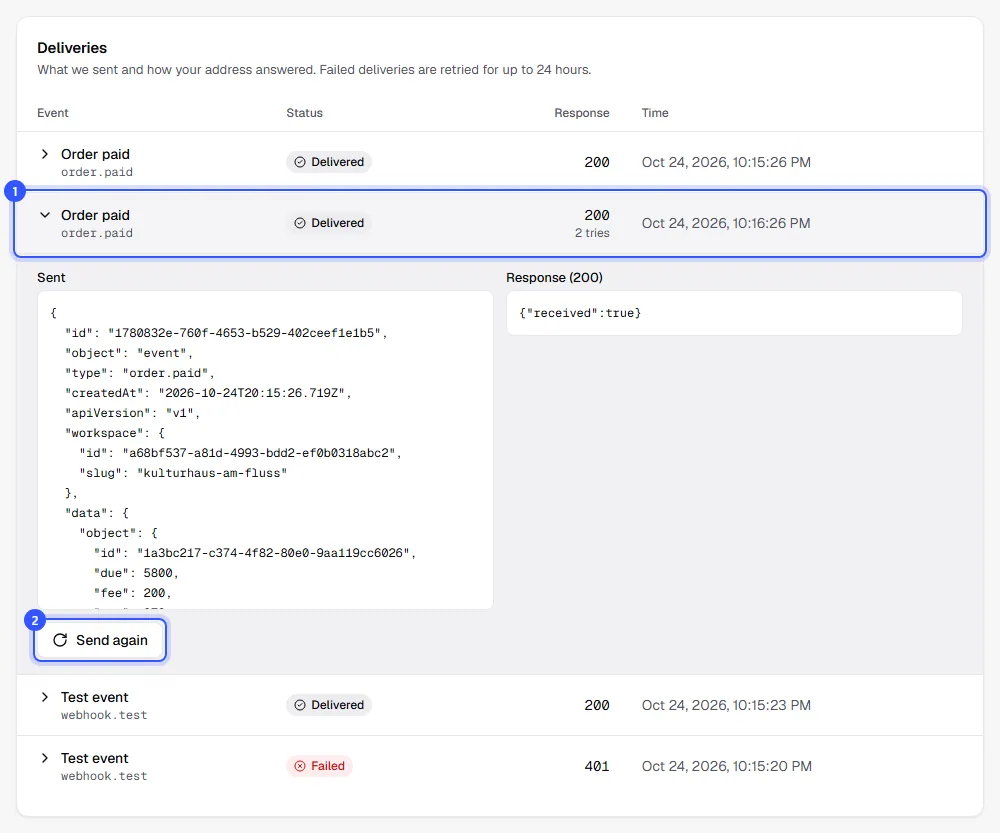
| Column | What it shows |
|---|---|
| Event | Name and type of the event |
| Status | Delivered, Pending or Failed. For Pending, it shows when we'll try next. |
| Response | The HTTP status of the last response and how many tries there were. A dash means there was no response, for example because the address couldn't be reached. |
| Time | When we last tried |
While something is pending, the list refreshes on its own. Load older entries with Show more. The log goes back 30 days.
When a delivery counts as delivered
A delivery counts as delivered when your address responds within ten seconds with a status between 200 and 299. Any other response, a redirect, a timeout or a failed connection counts as failed.
Retries
If a delivery fails, we automatically try again, up to eight times in total:
| Try | When |
|---|---|
| 1 | right away |
| 2 | 1 minute after the first |
| 3 | 5 minutes later |
| 4 | 30 minutes later |
| 5 | 2 hours later |
| 6 | 5 hours later |
| 7 | 10 hours later |
| 8 | 6 hours later |
That gives your address almost 24 hours to come back. If the last try fails too, the delivery is marked Failed. You can then send it again any time with Send again.
Test events are only tried once. They're also sent to endpoints that are turned off.
When an endpoint is paused
If a delivery fails for good and not a single delivery to this endpoint has succeeded in the last 24 hours, we pause it. It then shows Paused, and we email the recipients you've set under Settings → Notifications, or all owners and admins if you haven't added any.
Here's how to get going again:
- Check your address, for example by looking at the delivery log, and fix the problem.
- On the endpoint's page, click Turn on.
- Send a test event with Send test event to see that everything works again.
Common questions
My address was down for an hour. Is anything missing now?
No. Retries run for almost 24 hours, so everything from that hour will still arrive. You can see in the log whether it worked.
Can I resend all failed deliveries at once?
No, only one by one with Send again. If there are many, it's usually easier to fetch the data through the API.
Why doesn't "Send again" work?
If the endpoint is turned off or paused, sending again fails too. Turn it back on first.
How long can I see the content that was sent?
30 days. After that we delete the events and their deliveries, because they contain your buyers' data.