Secure your webhooks
Use the signing secret to check that a delivery really comes from TickySmart, and switch secrets without downtime.
Your webhook address is publicly reachable, so anyone could send something to it. That's why we sign every delivery with a secret that only you and we know. Check the signature before you trust the content, and don't process anything where it doesn't match.
The signing secret
Each endpoint has its own secret. It starts with whsec_ and is shown on the endpoint's page under Signing secret.
- Click Show and then Copy. Store the secret in your server's configuration, not in your code.
- Use Create new secret to replace it, for example if someone saw it who shouldn't have.
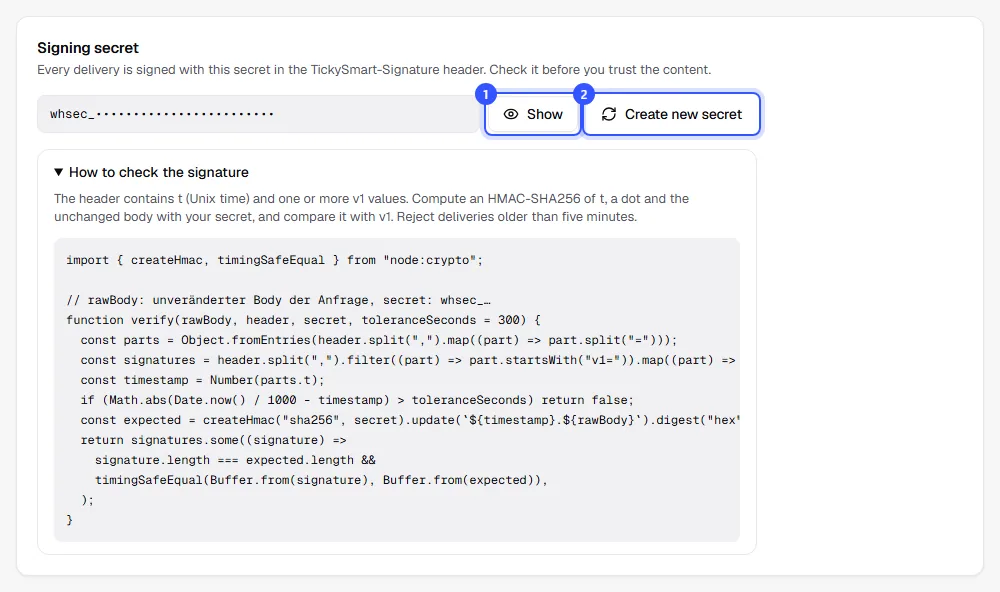
The dashboard also has the instructions with an example under How to check the signature.
How to check the signature
Every delivery has the TickySmart-Signature header, for example:
TickySmart-Signature: t=1792629600,v1=5257a869e7ec…0ce8e108d8bd
t is the time of the delivery as a Unix timestamp in seconds, v1 is the signature, a 64-character hexadecimal string (shortened here). To check it:
- Read
tand allv1values from the header. Usually there's one, and two while a secret is being replaced. - Compute an HMAC with SHA-256 over
t, a dot and the request body exactly as it arrived. The key is the whole secret, includingwhsec_. Write the result as lowercase hexadecimal. - If it matches one of the
v1values, the delivery comes from us. Compare with a function that always takes the same time. - Reject deliveries where
tis more than five minutes away from your clock. That way nobody can replay an old delivery.
Example in Node.js
A small receiver without extra packages. The secret comes from the TICKYSMART_WEBHOOK_SECRET environment variable:
import { createHmac, timingSafeEqual } from "node:crypto";
import { createServer } from "node:http";

const SECRET = process.env.TICKYSMART_WEBHOOK_SECRET; // whsec_…

function verify(rawBody, header, secret) {
  const parts = header.split(",");
  const timestamp = Number(
    parts.find((part) => part.startsWith("t="))?.slice(2),
  );
  const signatures = parts
    .filter((part) => part.startsWith("v1="))
    .map((part) => part.slice(3));
  // older than five minutes: reject
  if (!timestamp || Math.abs(Date.now() / 1000 - timestamp) > 300) {
    return false;
  }
  const expected = createHmac("sha256", secret)
    .update(`${timestamp}.${rawBody}`)
    .digest("hex");
  return signatures.some(
    (signature) =>
      signature.length === expected.length &&
      timingSafeEqual(Buffer.from(signature), Buffer.from(expected)),
  );
}

createServer((req, res) => {
  let rawBody = "";
  req.setEncoding("utf8");
  req.on("data", (chunk) => (rawBody += chunk));
  req.on("end", () => {
    const header = req.headers["tickysmart-signature"] ?? "";
    if (!verify(rawBody, header, SECRET)) {
      res.writeHead(400).end();
      return;
    }
    const event = JSON.parse(rawBody);
    // remember event.id, skip duplicates, then process
    res.writeHead(200, { "content-type": "application/json" });
    res.end(JSON.stringify({ received: true }));
  });
}).listen(3000);
If you use a framework such as Express, read the body as raw data before it's parsed as JSON. If the JSON is parsed and turned back into text, the signature won't match anymore.
Switch the secret
After you click Create new secret, the old secret stays valid for another 24 hours. During that time every delivery carries two v1 signatures, one with the old secret and one with the new one. If you check against all v1 values as shown above, everything keeps working while you put the new secret on your server. The date until which the old one is valid is shown below the secret.
Common questions
The signature never matches. Why?
Usually it's one of these:
- The body was changed before the check, for example parsed as JSON and written out again. Always check the unchanged text.
- You're using the secret of a different endpoint. Each endpoint has its own.
- The
whsec_at the start is missing. It's part of the secret. - Your server's clock is wrong, so the five-minute limit kicks in.
Who can see the secret?
Owners and admins on the endpoint's page, plus software with an API key that has access to Webhooks. We store it encrypted.
Can I choose the secret myself?
No. We generate it randomly when you add the endpoint and every time you replace it.
Isn't it enough to only accept requests from your IP addresses?
We don't publish fixed IP addresses for webhooks. The signature is the safe way: it proves that the content comes from us and wasn't changed on the way.