Feedback
Report a bug, request a feature or tell us what you've noticed, straight from the dashboard to the TickySmart team.
Feedback at the bottom of the sidebar lets you write directly to the TickySmart team. We read every message. Anyone on your team can send feedback, whatever their role.
Send feedback
- Click Feedback at the bottom left and choose what it's about: Report a bug, Request a feature or General feedback.
- Write your message, between 10 and 5,000 characters. For a bug, this helps us most: what did you do, what happened and what did you expect?
- If useful, attach up to five screenshots as JPEG, PNG, WebP or AVIF, up to 10 MB each. Drag them into the box or browse for them.
- Click Send feedback.
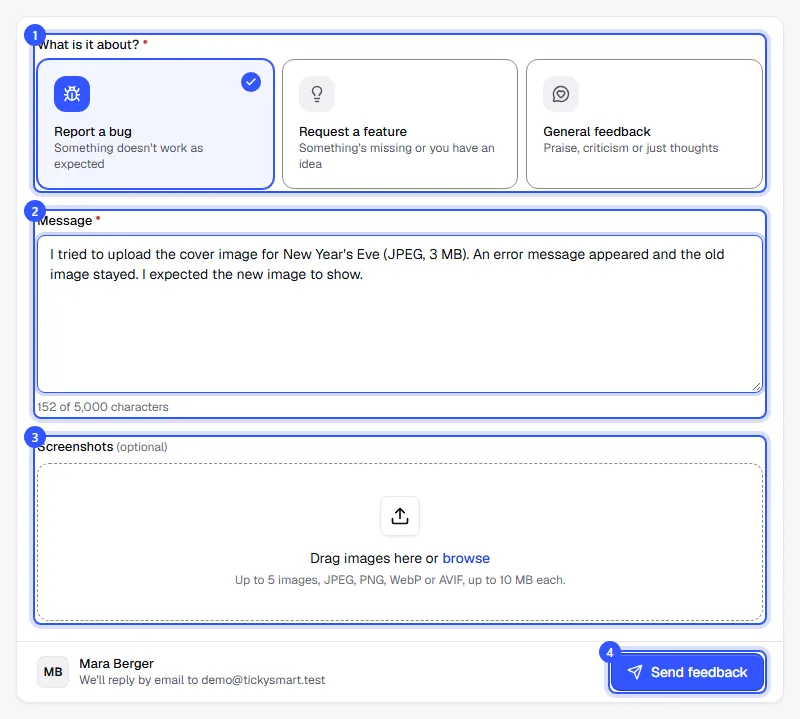
You'll then see Thanks, we got it. Send something else lets you write the next message straight away.
What we receive
Along with your message, we get your name, your email address, the workspace, your role and the dashboard page you opened the form from. That makes it easier to reproduce a bug. We send replies and follow-up questions by email to your address.
Common questions
Does my team see what I write?
No. The message only goes to the TickySmart team.
How often can I send feedback?
Up to ten messages per hour. If you send more, the dashboard asks you to try again a little later.
A buyer has a question about their order. Can they write to you?
Buyers contact you. Your contact email from your legal details is shown in the shop and in every order email. How to find and change orders is explained in Find orders.