Credits
Buy credits for the TickySmart fee, let them top up automatically, and understand what happens when they run out.
If you pay with credits, you buy them in advance, and every ticket sold uses one: 1 credit = 1 ticket. The more credits you buy at once, the less each one costs. New workspaces start with 50 free credits. Owners, admins and accounting can buy credits.
Keep an eye on your credits
Open Finance & credits.
- The Available credits card shows how many credits you have for new sales right now. Next to it you see the price per credit and what happens when credits run out.
- With Buy credits you can buy more at any time.
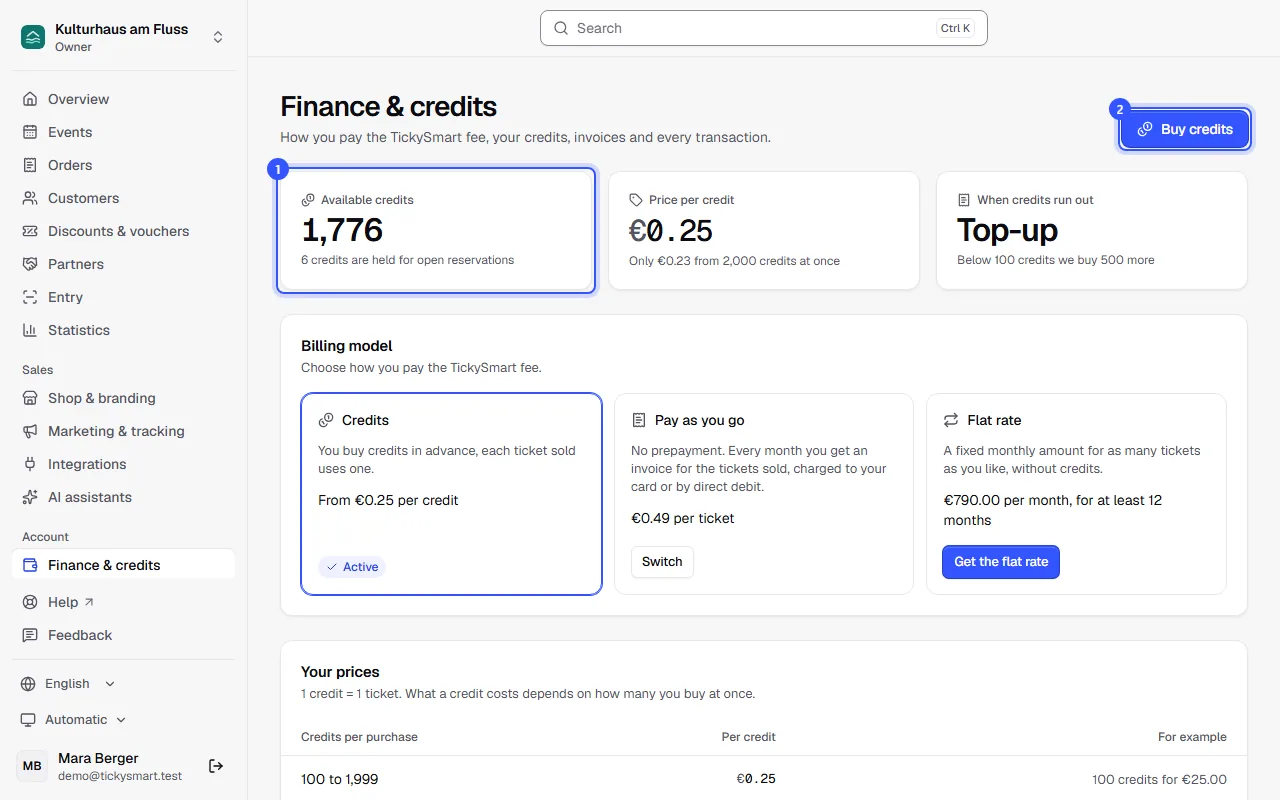
If an order is still in the checkout, we already hold the credits for it. They no longer count as available, so no more tickets are sold than there are credits. If the reservation expires, they're available again. If a buyer chooses bank transfer, we don't hold credits until the payment deadline: we charge them once the money arrives, below zero if necessary.
Buy credits
- Click Buy credits and pick one of the suggested amounts.
- Or enter your own amount under Credits, at least 100 credits.
- If you'd rather think in money, enter the amount under Or enter a budget (excl. VAT). We work out how many credits you get for it.
- If your amount is just below a cheaper tier, the dialog shows a tip: the larger amount doesn't cost more. The button in the tip takes it over.
- Click the button at the bottom. If you have a saved payment method, we charge it right away. Otherwise you go to Stripe's payment page and come back afterwards.
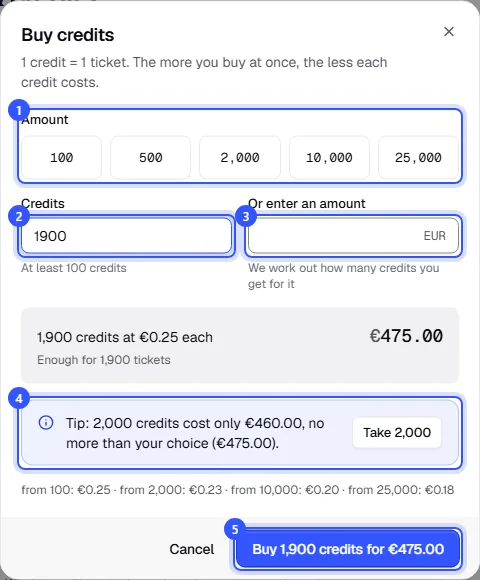
The grey box shows beforehand how many credits you get, what one costs, the total and how many tickets that covers. The credits are there as soon as you've paid. You get an invoice for every purchase, plus VAT where it applies: Invoices.
Why the tip? The price applies to the whole quantity of a purchase. In euros, 1,900 credits at €0.25 each cost €475 in total, while 2,000 credits at €0.23 each cost only €460.
When credits run out
In the When credits run out card you decide what happens before your credits are used up. Without a setting, sales stop as soon as no credits are available.
- Automatic top-up: with Set up, later Change, TickySmart buys more by itself as soon as your available credits drop below a limit.
- Keep selling with pay as you go: when no credits are available, you keep selling with pay as you go. Each ticket then goes on the monthly invoice at the pay-as-you-go price.
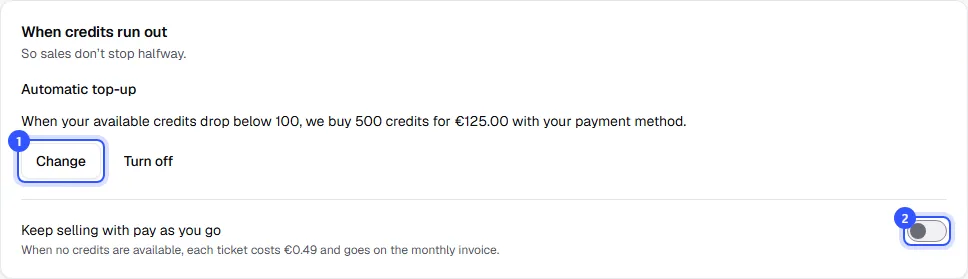
Both need a saved payment method. For Keep selling with pay as you go you also need your company name and address in the legal details.
Set up automatic top-up
- Enter how few available credits trigger a purchase.
- Enter how many credits to buy each time, and save. Below it you see what that costs.
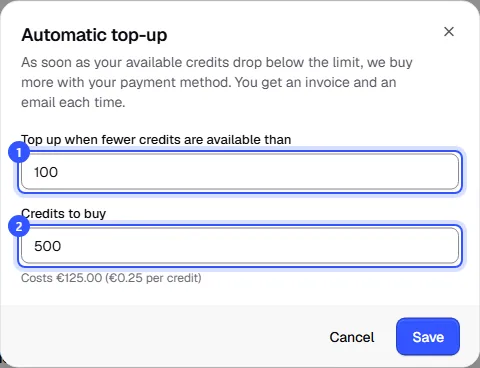
If fewer credits are already available, we buy more right after you save. You get an invoice and an email for every automatic purchase. If your bank declines a purchase, we stop topping up automatically until you add a new payment method. Turn it off with Turn off.
When credits run low
| Level | What happens |
|---|---|
| You’re running low on credits | Below 20% of your last purchase. We send an email. |
| Only a few credits left | Below 10% of your last purchase. We send another email. |
| Your credits are used up | No credits available. New sales stop, and the shop shows Ticket sales are paused right now. You can't add guests either. Events without credits and vouchers keep selling. With Keep selling with pay as you go, sales keep going as usual. |
As soon as you buy credits, sales start again. The emails go to owners, admins and accounting, each level once until the next purchase. With automatic top-up it usually doesn't get that far.
If your credits probably won't cover all open seats at your upcoming events, we warn you on the finance page and on the events' pages. Events without a capacity limit aren't included. With automatic top-up or Keep selling with pay as you go, the warning doesn't show. How many credits a ticket type uses once it sells out, you already see when you create it: Ticket types.
What uses credits and what doesn't
| What | Credits |
|---|---|
| Ticket sold | 1 credit |
| Free ticket, for example for the guest list | depending on your prices, 1 credit or none |
| Invoice to a business customer | 2 credits, credit notes are free |
| Extras such as drink tokens or merchandise | none |
| Resold ticket | the seat only costs once |
Credits come back if you cancel a date or an event and refund the tickets. For single cancellations it depends on your prices; Your prices shows what applies to you. Credits don't expire. They can't be paid out.
Credit transactions
At the bottom, Credit transactions lists every movement, newest first: how many credits were added or used and how many were left afterwards. For tickets you see the event and a link to the order.
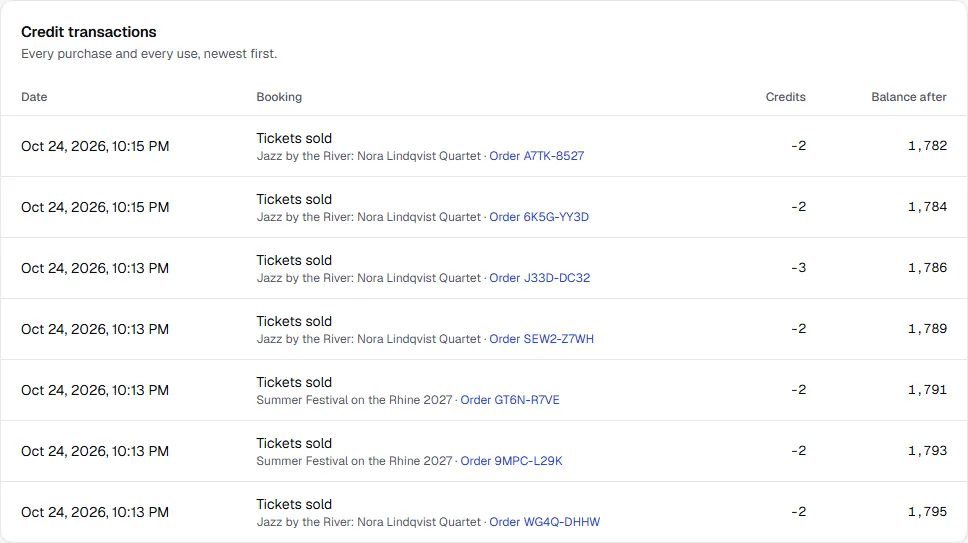
| Entry | Meaning |
|---|---|
| Free starting credits | The free credits to start with |
| Purchase | Your purchase, with the price per credit |
| Tickets sold | Credits for an order |
| Invoice to business customer | Credits for an invoice to a business customer |
| Back after cancellation | Credits for refunded tickets back, for example after a cancellation |
| Credits from TickySmart | Credits we give you |
| From your earlier balance | Balance from before credits, converted into credits |
| Purchase reversed | A purchase whose payment was reversed |
| Purchase valid again | A reversed purchase that was paid after all |
| Correction | A correction |
Common questions
How many credits should I buy?
Look at the open seats of your upcoming events and the warning about them. The more you buy at once, the cheaper each credit, and since credits don't expire, nothing is lost. With automatic top-up you don't have to think about it.
Why are my credits below zero?
There are two possible reasons: the payment for a purchase was reversed, for example because a direct debit came back, and the credits were already used. Or a payment arrived when no credits were available, for example a bank transfer or an invoice to a business customer. Your next purchase makes up the difference first. While you're below zero, sales stop just like at 0 credits.
Do I get credits back if I stop?
No. Credits you buy don't expire, but they can't be paid out. If you're not sure how long you'll be selling, buy smaller amounts more often.
Can I buy credits if I pay as you go?
Yes. Credits you buy are then used before pay as you go. On the flat rate, tickets don't use credits, so there's no button to buy them.
What happened to my earlier balance?
If you had a balance before credits were introduced, we converted it into credits. The credit transactions show this as From your earlier balance.