AI in TickySmart
What the AI does for you, which parts are free and how you set the way AI texts sound.
TickySmart has AI built in that saves you work: it translates your texts, writes descriptions, reads events from posters, finds info on artists and checks your events. It suggests, you decide. Nothing is saved until you save it.
What the AI can do
Open AI in the sidebar. Under Features you see every feature and where to find it.
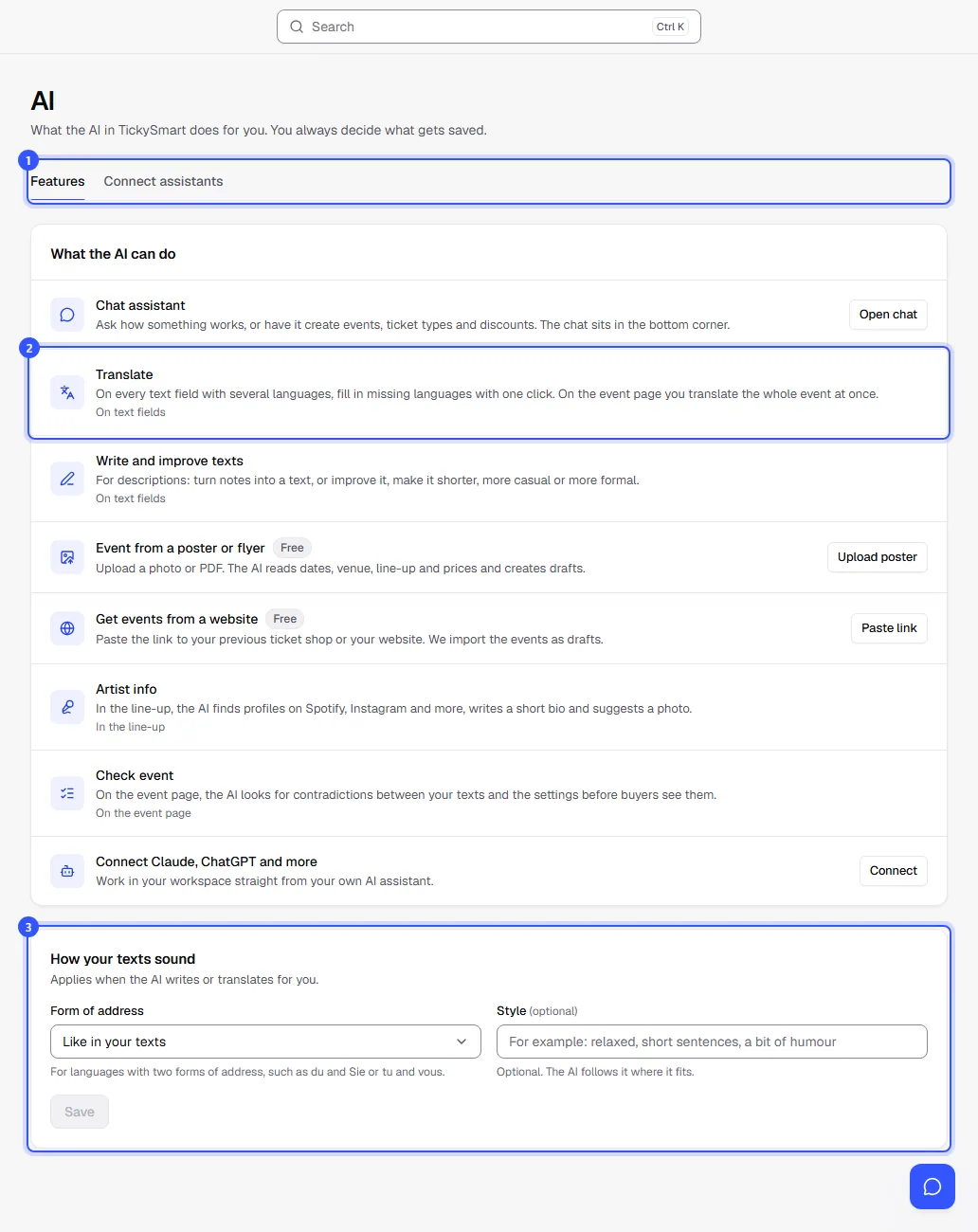
- Use the tabs to switch to Connect assistants if you want to connect Claude, ChatGPT or another assistant: Connect AI assistants.
- Each feature is listed with a short explanation:
- Chat assistant: ask questions and get tasks done right in the dashboard: Chat assistant and support.
- Translate and Write and improve texts: on text fields and for whole events: Translate and write texts.
- Event from a poster or flyer: upload a photo or PDF, check the drafts: Event from a poster or flyer.
- Get events from a website: bring over events from your previous ticket shop or your website: Switching from another platform.
- Artist info: profiles, a short bio and a photo for your line-up: Line-up.
- Check event: find contradictions between your texts and the settings: Check an event.
- Under How your texts sound you set how the AI writes.
Free or paid
Reading events from posters and importing events from other platforms or your website is always free.
All other AI features are part of the paid plans. They’re available once your workspace has bought credits, uses pay as you go or has the flatrate. There’s no separate AI subscription. The free starter credits don’t count. Until then you see the buttons with a lock, and a click tells you how to unlock them.
How your texts sound
The AI writes and translates the way you set it here:
- Form of address: Like in your texts, Informal or Formal. This applies to every language with two forms of address, such as du and Sie in German or tu and vous in French. With Like in your texts the AI follows your existing texts.
- Style: optional, a few words on the tone, such as “relaxed, short sentences, a bit of humour”.
Owners and everyone allowed to edit settings can change this.
Limits
To keep the AI fast for everyone, there’s a generous limit on AI actions per month and per person per day. With the flatrate it’s higher, and twice as high in the first 30 days. You normally won’t notice it. When it gets close, the AI page shows how many actions are left. The chat assistant has its own limits.
Common questions
Does the AI save anything by itself?
No. Translations and texts go into the field, and they’re saved with your usual save. Posters only result in drafts. The one exception is Translate event: there you explicitly ask for the whole event to be translated and saved.
What does TickySmart send to the AI?
Only what the feature needs: the text you want to translate, the details of the event you check, or the poster you upload. We delete posters as soon as they’ve been read.
Which languages does the AI translate into?
Into your shop’s languages. You set them under Settings › General in Languages for your texts.
Can I turn the AI off?
The buttons are there, but you don’t have to use them. Nothing happens without a click.