Scanning offline
How the scan app keeps checking tickets when the connection drops at the entrance, and how the scans reach the dashboard afterwards.
The connection at the entrance is often weak, especially when lots of people arrive at once. The scan app copes with that: it loads the event's tickets onto the device beforehand and checks tickets by itself when offline, using the same rules as online. As soon as there's a connection again, it sends the scans.
Before doors open
The first time it starts, the scan app needs internet to load the tickets. After that, it keeps the list up to date by itself whenever it's online.
To see whether the list is there, open the settings and look under This device: it shows how many tickets are saved offline and when the list was last synced.
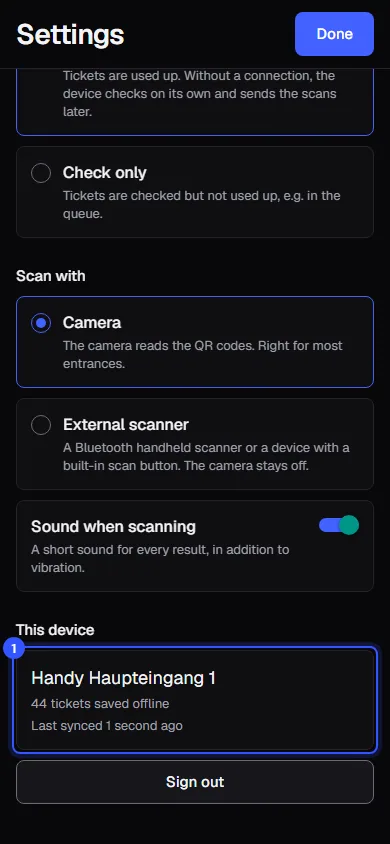
The device holds today's tickets, plus the event's passes and multi-entry cards and the scans of the last few hours, so re-entry and waiting times are right even offline.
When the connection drops
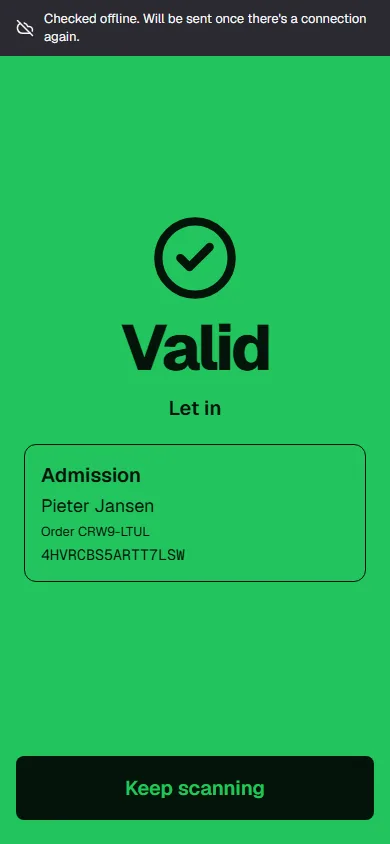
If the server doesn't answer within two and a half seconds, the app checks the ticket itself. The result looks as usual, with a dark strip at the top: Checked offline. Will be sent once there's a connection again.
The top of the app then says Offline and how many scans are waiting to upload. Even offline, the app spots fake QR codes, because every code is signed. Searching by name keeps working too, in the tickets saved on the device.
If a ticket is genuine but not on the device yet, for example because it was only just bought, the app shows yellow with Genuine ticket, but not saved on this device yet Staff then decide.
When the connection comes back
The app uploads the waiting scans by itself, in the order they happened, and fetches the latest tickets. In the dashboard you can see what's still missing:
- In the device list under Still to upload.
- In the live view under Devices online. Scans sent later carry the note Scanned offline there.
If two offline devices let in the same ticket, the server notices when the scans arrive. The second scan shows up with Let in twice while offline and counts towards Double scans.
Common questions
The device says "No connection" and doesn't scan at all
Then it has never been online and doesn't know the tickets. The app needs internet once on its first start. Tap Try again as soon as the device is connected.
How long can a device scan offline?
All evening. It checks against the list it last loaded. Tickets sold after that only become known after the next sync.
Are the times of offline scans correct?
Yes. The app regularly syncs its clock with the server while it's online, so even a phone set to the wrong time records the right one.
Can I use "Check only" offline?
Yes. The app then shows offline whether a ticket is valid, without using it up.