Notifications
The reminder your buyers get before the event, the emails you receive about your sales and who they go to.
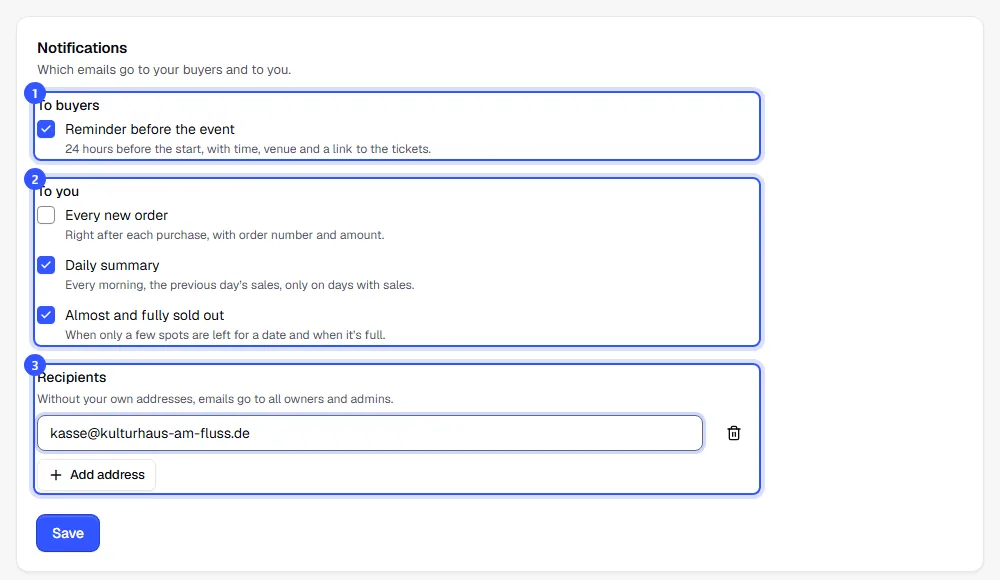
Under Settings → Notifications you decide whether your buyers get a reminder before the event and which emails you receive about your sales. Owners and admins can change these settings.
Set them up
- Under To buyers, turn the Reminder before the event on or off. Your buyers then get an email 24 hours before the start with the time, the venue and a link to their tickets.
- Under To you, choose which emails you receive. The table below explains what's in them.
- Under Recipients, use Add address to add up to five addresses, such as a shared inbox for your team.
- Click Save.
The emails to you
| When it arrives | Default | |
|---|---|---|
| Every new order | Right after every purchase, with order number and amount. Vouchers sold trigger it too. | Off |
| Daily summary | Every morning from 8 am in your workspace's time zone: the previous day's orders, tickets and revenue, broken down by event. Only on days with sales. | On |
| Almost and fully sold out | When only about 10% of a date's places are left and when it's full, once each per date | On |
The buyer reminder is switched on from the start.
Without a switch, because you need to act: an email when a buyer requested an invoice at checkout that we couldn't issue automatically. It tells you why. More on this under Invoices for business customers.
Who gets the emails
Without your own addresses, the emails go to all owners and admins, each in their account language. If you add addresses, the emails only go there, in your shop's default language.
Common questions
Do buyers still get their tickets if I turn the reminder off?
Yes. Order confirmation and tickets always go out. This setting only controls the extra reminder before the event. Which other emails your buyers receive is listed under Emails to buyers.
Why didn't a buyer get a reminder?
The reminder goes out once per date, as soon as it starts in less than 24 hours. If you then move the date back by a day or more, we remind buyers again before the new start. Anyone who buys after that won't get one, but they've only just received their tickets by email. Dates added less than two hours before they start get no reminder. Guests on the guest list are only reminded if you've already sent them their tickets.
Why didn't I get an alert even though the date is almost full?
Alerts only exist for dates with a capacity, not for time slots. Each date triggers one "almost full" and one "sold out" email at most.
Can everyone on the team choose their own emails?
No, the settings apply to the whole workspace. Add whoever should receive the emails as a recipient.