How you pay the TickySmart fee
The three models, credits, pay as you go and flat rate, what they cost, what happens when you switch and what the flat rate contract covers.
For every ticket sold you pay a small fee to TickySmart. You choose how to pay it under Finance & credits: in advance with credits, afterwards with pay as you go, or a fixed amount with a flat rate. This is separate from your buyers' ticket money, which goes straight to your payment account.
The three models
| Model | How it works |
|---|---|
| Credits | You buy credits in advance, each ticket sold uses one. If you like, pay as you go takes over when they run out. 1 credit = 1 ticket. More: Credits |
| Pay as you go | Nothing to buy in advance: each ticket costs a fixed price, invoiced once a month by card or direct debit. Credits you already have are used first. |
| Flat rate | A fixed monthly amount for as many tickets as you like, without credits. |
New workspaces start with credits and get 50 free credits. Owners, admins and accounting can see and change billing.
What it costs
Your prices shows your prices in your workspace currency. In euros, for example, they look like this:
| Model | Price |
|---|---|
| Credits | €0.25 per credit from 100 credits, €0.23 from 2,000, €0.20 from 10,000 and €0.18 from 25,000 |
| Pay as you go | €0.49 per ticket |
| Flat rate | €790 per month, for at least 12 months |
All prices are net; VAT is added where it applies. Other currencies use rounded equivalents, for example in Swiss francs or pounds. What applies to you is always on your finance page.
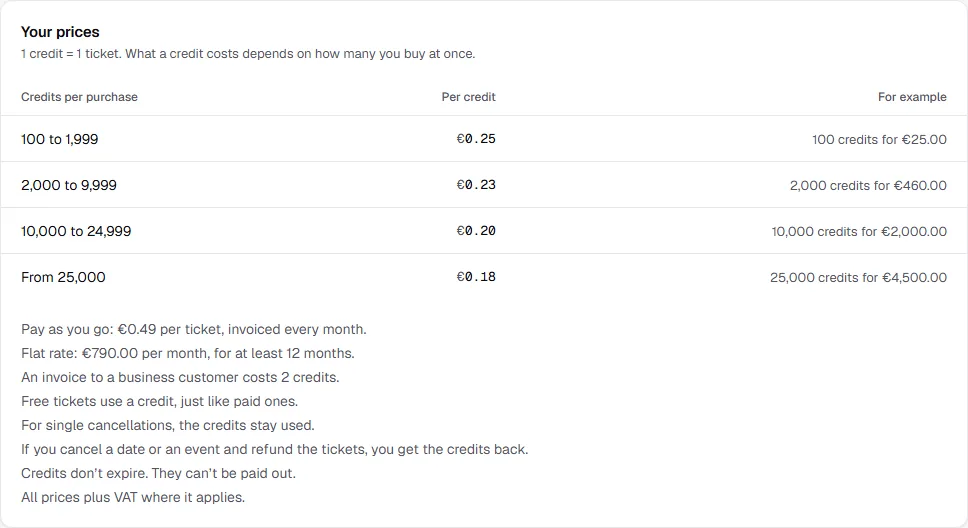
For credits, the quantity of a single purchase counts: if you buy 2,000 credits at once, each one costs €0.23. Earlier purchases don't count towards this. Below the tiers you see what else applies:
- Business invoices: an invoice to a business customer costs 2 credits, and nothing extra on the flat rate.
- Free tickets: depending on your prices, they use a credit like paid ones, or none.
- Cancellations: for single cancellations the credits usually stay used. If you cancel a date or an event and refund the tickets, you always get the credits back.
- Credits don't expire. They can't be paid out.
Only admission tickets count. Extras such as drink tokens or merchandise cost nothing. If a buyer resells their ticket, the seat only costs once.
Switch models
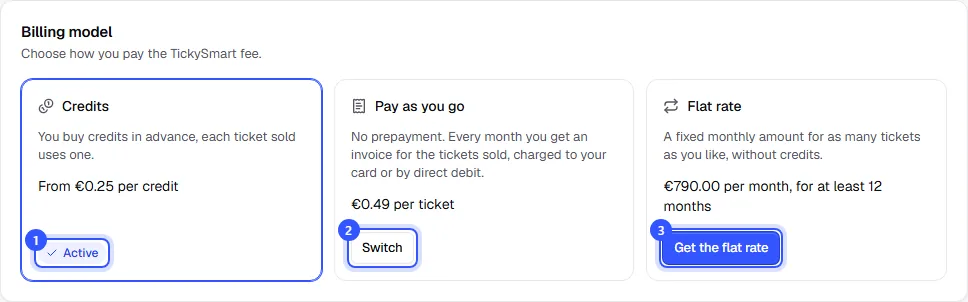
- You can spot the active model by Active. Below it you see what it costs.
- Click Switch on another model.
- For the flat rate, click Get the flat rate.
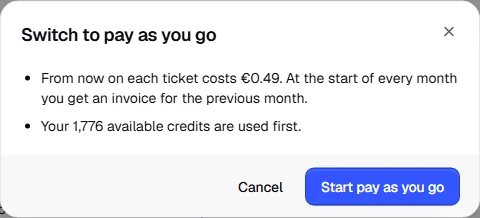
Before anything happens, a dialog tells you in plain words what the switch does. Only the button at the bottom switches.
| Switch | What happens |
|---|---|
| To Pay as you go | Applies right away. Your available credits are used first; after that each ticket costs the pay-as-you-go price. |
| Away from Pay as you go | Applies right away. Pay-as-you-go fees up to then go on your next monthly invoice as usual. |
| To the Flat rate | Starts right away with the contract; the first month is charged straight away. Your credits stay. |
| Away from the Flat rate | By cancelling, at the earliest when the minimum term ends. |
For Pay as you go and the flat rate you need a saved payment method and your company name and address in the legal details. If something is missing, the dialog tells you what. While a payment to us has failed, you can't switch. You can still cancel a flat rate at any time.
Pay as you go
You don't pay anything in advance. Every ticket sold goes on the next invoice at its price. At the top of the finance page, Open since the last invoice shows what has added up since the last invoice.
- Monthly invoice: at the start of every month for the previous month, in your workspace's time zone, charged to your card or by direct debit.
- Interim invoice: once €100 is open before then (a similar amount in other currencies), you get an invoice right away so not too much is due at once.
- Credits first: if you still have credits, they're used before pay as you go.
If a payment fails, sales keep going for another 14 days. If the invoice hasn't been paid by then, new sales pause until it is: When a payment fails.
Flat rate
With the flat rate you pay a fixed amount per month and sell as many tickets as you like, without credits. It's a contract between your workspace and TickySmart, so only the workspace owner can take it out.
- Click Get the flat rate. The dialog shows the price, the minimum term and what applies afterwards.
- Enter your name under Your full name. You agree to the contract on behalf of your workspace.
- Tick the box to confirm you agree to the contract on these terms, and click the button at the bottom.
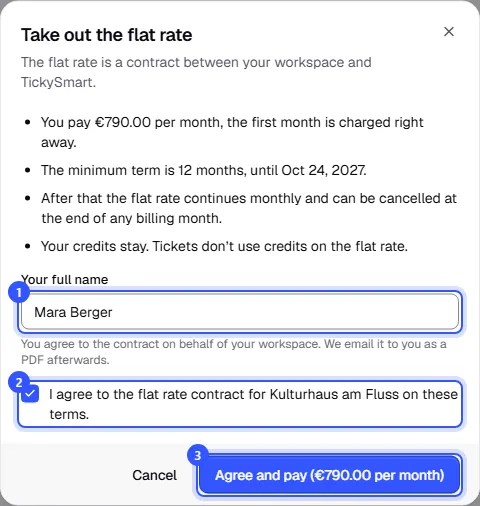
The first month is charged right away, then every month. We email you the contract as a PDF. Under Your flat rate contract you see who agreed to it and when, and until when the minimum term runs, and you download it with Contract as PDF.
- Minimum term: 12 months. After that the flat rate continues monthly and can be cancelled at the end of any billing month.
- Credits: stay and apply again if you switch back to credits later.
- Unpaid invoice: if a payment fails, sales keep going as usual for another 7 days. If the invoice hasn't been paid by then, new sales pause until it is.
Cancel the flat rate
- Under Your flat rate contract, click Cancel flat rate.
- The dialog shows the day the flat rate ends: the end of the minimum term or, if that's already over, the end of the current billing month. Choose how you want to pay afterwards and confirm.
Until then you keep selling with the flat rate as usual. The top of the page shows when it ends. With Keep the flat rate you can take back the cancellation until then.
Common questions
Which model suits me?
With credits you pay in advance without any commitment; the bigger the purchase, the cheaper each credit. Pay as you go suits you if you don't want to buy anything in advance and prefer one invoice a month. The flat rate is worth it if you sell so many tickets that it's cheaper than credits.
Why can't I switch to pay as you go?
If it says Not available for your workspace. Get in touch if you’d like to use it., the model isn't available for your workspace. If it says Available once payments are set up, payment processing isn't set up yet. If your payment method or company address is missing, the dialog tells you when you switch.
What's the difference between credits with “Keep selling with pay as you go” and pay as you go?
In both cases your credits are used first, then each ticket costs the pay-as-you-go price on the monthly invoice. With credits you keep buying in advance at a lower price, can turn on automatic top-up and get warnings when credits run low. Pay as you go is for anyone who doesn't want to buy anything in advance.
What happens to my credits when I switch?
They stay. With pay as you go they're used first; on the flat rate they wait until you pay with credits again.
Are there prices for my currency?
If your finance page shows a note that there are no prices for your currency yet instead of your prices, we don't charge anything for your sales until there are.