Payment methods in your shop
Choose which payment methods buyers see at checkout, and decide whether a method runs through Stripe, Mollie or PayPal when more than one offers it.
The payment methods you can offer depend on the accounts you've connected: everything your Stripe, Mollie or PayPal account accepts shows up in one list. There you turn on what buyers see at checkout. You can also offer bank transfer straight to your bank account.
Turn payment methods on and off
Open Settings → Payments. Under Payment methods in your shop you'll find every payment method along with the provider it runs through. Only the owner can change this.
- Use the switch on the right to add a payment method to your shop or take it out. The change applies right away.
- If a method says Still off at Stripe, you need to turn it on with the provider first. The Turn on at Stripe link takes you straight there. Afterwards you can offer it here.
- Set up bank transfer with Set up and change it later with Edit. Everything about it is in Bank transfer.
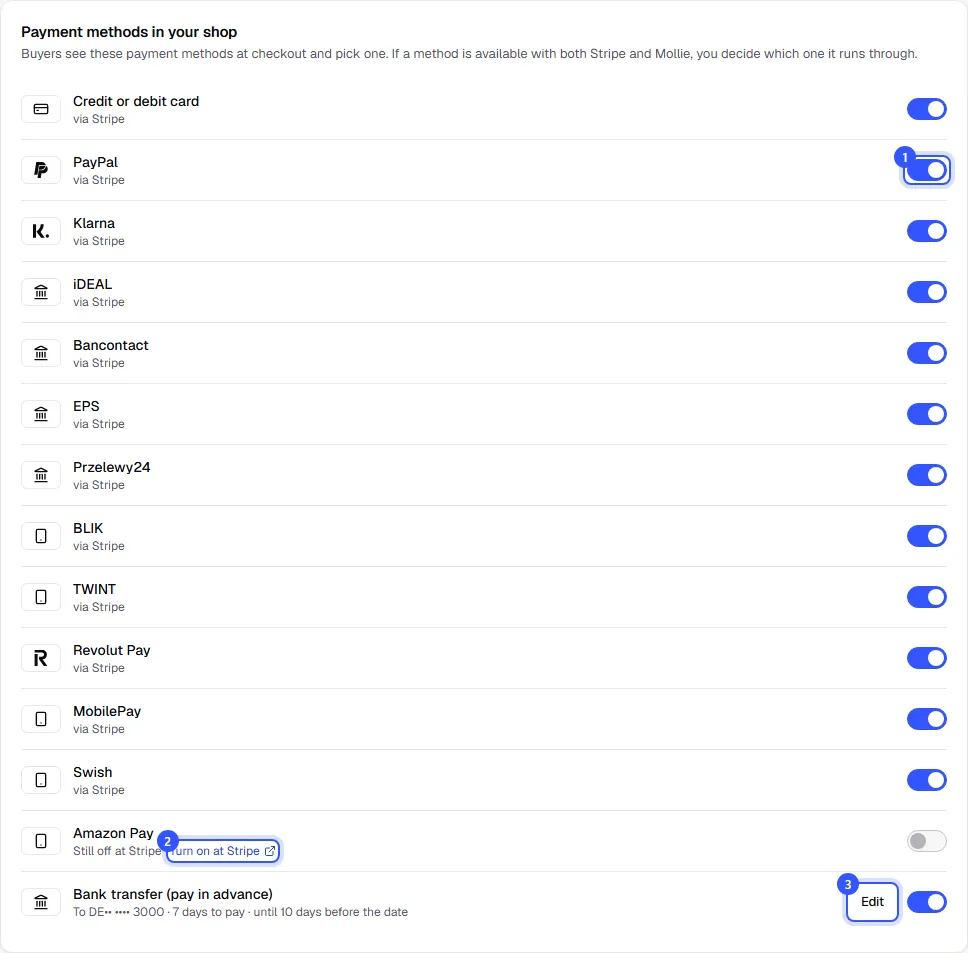
At least one payment method has to stay on, otherwise nobody could pay. That's why you can't turn off the last switch.
| Note under the payment method | What it means |
|---|---|
| via Stripe | The method is on and runs through this account. |
| available with Stripe | The provider has enabled it, but it's off in your shop. |
| Under review at Stripe | The provider is still reviewing the method or your account. |
| Still off at Stripe | Turned off with the provider. Use the link next to it to turn it on there. |
Several providers together
If you've connected several providers and a method is available with more than one, such as PayPal through Mollie and directly through PayPal, or card through Stripe and Mollie, you'll see a picker next to the switch. Use it to decide which account the method runs through. At checkout, buyers only see the payment method, not the provider.
If you've never changed anything in the list, you'll see this note at the top: Still automatic: buyers choose on the payment page of your default account. As soon as you change something here, your selection applies.
What buyers see at checkout
At checkout, buyers pick one of the payment methods you've turned on. We only show the ones that fit the order's currency: BLIK only works in złoty, TWINT only in Swiss francs, iDEAL only in euros. Bank transfer only appears in your bank account's currency and up to the cut-off before the date.
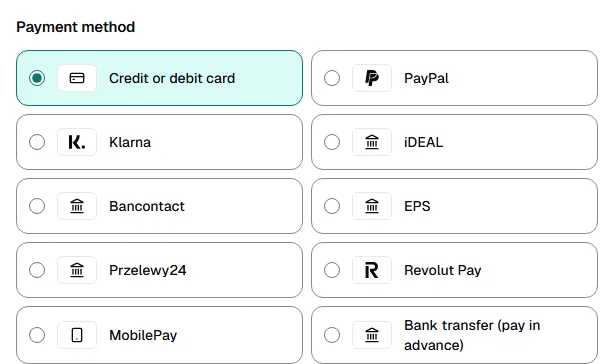
With Stripe, Apple Pay and Google Pay are part of Credit or debit card: the payment form shows them when the buyer's device supports them. With Mollie, Apple Pay is a payment method of its own.
Common questions
Why is a payment method missing that I turned on with my provider?
Either the provider is still reviewing it, in which case it says Under review at Stripe. Or it doesn't confirm instantly, like direct debit, so we don't offer it at all. If it's only missing at checkout, it usually doesn't match the order's currency.
Can I offer PayPal?
Yes, in two ways: connect your PayPal business account directly (Get paid with PayPal), or turn on PayPal in your Mollie account. Stripe currently rarely offers PayPal for accounts through TickySmart.
Can I change the order at checkout?
No, the order is fixed. Card always comes first and bank transfer last.
Who pays the fees for a card payment?
You do, under your agreement with Stripe, Mollie or PayPal. The provider deducts its fee directly. We bill the TickySmart fee separately: How you pay the TickySmart fee.
Who can change the payment methods?
Only the owner. Anyone who can view the settings sees the list but can't switch anything.