Custom domain
Run your shop under your own address, such as tickets.your-club.com, with two DNS records and an automatic certificate.
With a custom domain, your shop runs under your own address, for example tickets.kulturhaus-am-fluss.de instead of shop.tickysmart.io/kulturhaus-am-fluss. All you need is two records at your domain provider. We take care of the certificate for secure connections automatically.
Connect your domain
Open Shop & branding and scroll to the Own domain card. Owners and admins can do this.
- Under Domain, enter the address your shop should be reachable at. A subdomain such as tickets.your-club.com works best.
- Click Connect.

Create the DNS records
Once connected, the card shows two records to create at your domain provider, with buttons to copy each value.
- Sign in to your domain provider, open your domain's DNS settings and create a record of type CNAME. Use your subdomain as the Name and domains.tickysmart.io as the Target. Many providers only want the first part as the name, for example "tickets".
- Also create a record of type TXT with the name and verification code from the card. This shows us the domain is yours. Many providers only want something like "_tickysmart.tickets" as the name.
- Wait. While a record is missing, the domain shows Waiting for DNS, along with what the last check found.
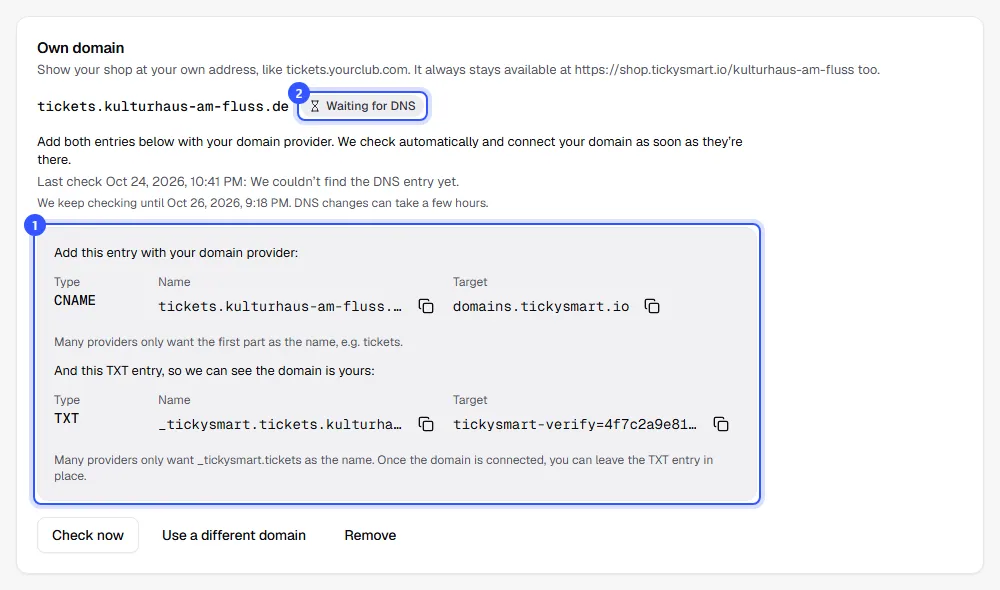
If it doesn’t work right away, it’s usually the name, a dot at the end or the wrong place for the records. Creating DNS records explains this.
We check automatically every minute, for up to 48 hours. DNS changes sometimes take a few hours to reach everywhere. Check now starts a check right away.
Once the domain is active
When both records are right, we fetch the certificate for secure connections. That usually takes a few minutes. The domain then shows Active, and everyone who gets notifications receives an email.
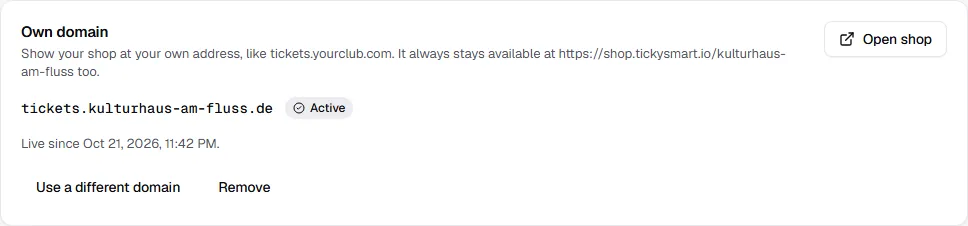
From now on, every link from the dashboard points to your domain, such as View in shop and your partner links. The old address on shop.tickysmart.io keeps working, but search engines are told your domain is the main address. Once a day we check that the CNAME record is still in place and show a notice in the card if it isn't. You can leave the TXT record in place.
| Status | What's happening |
|---|---|
| Waiting for DNS | We're looking for the DNS records. |
| Certificate pending | The records are right; the certificate is being issued. |
| Active | Your shop runs under your domain. |
| Not connected | We checked for 48 hours and couldn't connect the domain, or another workspace took it over. Check the records and click Check now. |
Common questions
What does the message from the last check mean?
| Message | What you can do |
|---|---|
| We couldn’t find the DNS entry yet. | Create the CNAME record, or wait a little longer if you just did. |
| The DNS entry still points somewhere else. | Check the target. It must be exactly domains.tickysmart.io. |
| There’s an IPv6 entry (AAAA) that points somewhere else. Please delete it. | Delete the AAAA record for this subdomain at your provider. |
| We couldn’t find the TXT entry with your verification code yet. | Create the TXT record with the name and verification code from the card. Copy both so no character is missing. |
| The certificate couldn’t be issued yet. We’ll keep trying. | Waiting usually helps. If the message stays, check the records again. |
| Another workspace added the verification code to this domain and took it over. | See below. |
Can I connect more than one domain?
No, each workspace has one custom domain. Use Use a different domain to swap it for another one.
What happens if I remove the domain?
Your shop is no longer reachable at that address, but it still is on shop.tickysmart.io. Orders and tickets stay valid. You can then delete the DNS records at your provider.
Someone else has entered my domain
Anyone can enter a domain, but it only gets connected with the matching TXT record. Only someone who controls the domain's DNS settings can create it. So just create both records, and we'll connect the domain to your shop.
If another workspace adds its verification code to your domain, it takes the domain over and you get an email. If the domain is yours, someone else has access to your DNS settings. Check the records at your provider and click Check now. You'll get a new verification code: add it as a TXT record and delete the records with someone else's code.